
The master chat and decision mode
The master chat is one place to write whatever comes to mind, across all your projects, without first choosing where it goes. A model reads each message together with what your sessions are doing and what your roadmaps hold, and sends it to the session already on that subject, starts a new session, files it as an idea or a bug, asks a project's roadmap, or answers itself. Every answer comes back to the chat, and so does whatever a session waits on you for: a permission, a question, a plan, or an entry of the queue, as a card you answer right there.
What it is for
Without it, every thought needs a door picked by hand: the idea palette, a roadmap's Ask tab, a session's prompt box, or a new session. The chat is for the moments you would rather not think about that:
- a follow-up for a session that is working on something ("use a honeypot, not a captcha"),
- something to do now that no session is on yet,
- an idea or a bug you just noticed,
- a question about what runs, what waits for you or what comes next,
- answering what your sessions ask you, one after the other, without opening each.
It fits a phone well: you write or dictate from anywhere and read the answers when they come.
The chat is the heart of what cterm calls decision mode: the aim that you only decide while projects run on their own. There is no separate decision-mode screen; the pieces are this chat with its cards of what waits on you, the queue below, and the steward placing ideas by itself.
How to use it
Open it
- The chat button in the sidebar's head, with a count of answers that came since you last looked, on any of your devices: the count is the same on the Mac and the phone.
- Press
Manywhere outside the terminal and text fields. - On a phone, the chat button in the top bar.
- Go to
/chatin the address bar, which also works as a home-screen shortcut.
The chat takes the main area; its × goes back to the session you had open.
It can also sit in a panel of the master view, on a second monitor beside
the rest of what runs: the same conversations, cards and box, with no × and no Esc to close it.
Write a message
Type in Write anything: cterm decides where it goes. @, # or / to pick it yourself and press Enter (or the arrow at the box's right end,
Send, whose tooltip has the keys); Shift+Enter breaks a line. The box is one line high, like a session's box:
once what you write needs more it takes the whole width and grows, with the microphone and Send on a row under it,
and goes back to one line when emptied. While a message is on its way the arrow turns into three dots. The
microphone puts what you say into the box for you to read before sending.
What you type and leave unsent stays in the box when you close the chat and come back, in this browser; it goes once the message is sent.
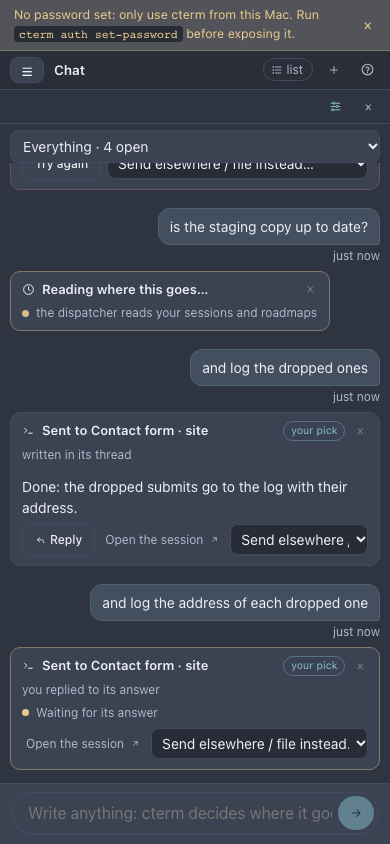
Each message gets a card that says what was decided, by whom (cterm decided, or your pick), why, and how it stands. What the card can say:
- Sent to a session: the message is typed into that session, and the end of its turn is the answer. A long answer is folded under the session's brief line with Show the whole answer; the newest one shows whole. While the session works on it, the card says Working on it with the time counting, the tool it runs right now (Bash · npm test) and the session's brief line once it has a new one; the dots show only while nothing more is known. When the session stops for a permission, a question or a plan, the card says Needs you and Open the session becomes its main button. A turn past ten minutes reads A long turn: still working, with when it last did something, so a long piece of work does not look stuck.
- Sent to a Codex or Gemini session, with the provider named after it: the message is pasted into its box once it's back there ("Held until Codex is back at its box"), and the card waits while it works. The answer is Codex's last message of the turn, or what Gemini's screen shows at the end of its turn; a line under it says which.
- New session in a project: work asked for now that no session is on. cterm writes the task out from the conversation, starts a plain Claude session in that project and brings its first answer back.
- Filed as an idea or as a bug report: the row waits in the project's inbox for the steward. Undo takes it back.
- A question that needs the project's files goes to that project's roadmap Ask, with Open the project. A follow-up ("and is it in production?") is Followed up in the same Ask conversation, which still has the earlier answer in mind; a new question reaches the Ask written out in full, since the Ask has not seen the chat.
- An answer from the chat itself, when what it knows about your sessions and roadmaps is enough. A reply to that answer ("it is there, you did not see it") stays with the chat: it answers again, or, when you ask for the mistake to be looked into, files a bug report in cterm's own project. Quoting a session's id in that reply does not send it to that session.
- A follow-up sent to a session that did not take part in the exchange it follows (the chat's own answer, another session's) carries that exchange: the session reads your earlier message and the start of its answer, marked as context from the master chat, before your new words, so it knows what "it" is.
- Where should this go? when two places fit equally: tap one of the offered picks.
- Not dispatched, with the reason and Try again.
When the model got it wrong, use Send elsewhere / file instead… on the card: any of your sessions, Start a new session in any of your projects, or a project's idea, bug or Ask. It acts at once, with no new model call, and takes back a row it filed. Open the session jumps to the session a card went to.
Pick where it goes yourself
When you already know where a message belongs, say so with its first words and no model reads it: it goes there at once, at no cost and with no chance of a wrong guess.
@session-name …: typed into that session, like a message written in its conversation.@project-name …: a new session in that project, with the rest of the message as its task.#p3.2 …: to the session working on that roadmap item, or, when none runs, a new session on it. When two of your roadmaps have an item of that id, name the project first:@project #p3.2 …./idea …and/bug …: filed in a project's inbox. Name it with/idea @project …(or@project /idea …); with no project named it goes to your one project with a roadmap, or the card asks which. A session's name works too:/bug @session …files it in that session's project.
Typing @, # or / at the start opens a menu over the box: @ lists your sessions (running ones first, each with
its project, item and what it is doing) and then your projects, # the open items of your roadmaps in the steward's
order, / idea and bug. What you type narrows it; the arrows move, Tab or Enter takes one, Esc closes the
menu and keeps what you wrote. A line over the box says where the message will go, with no dispatcher call.
The session, the inbox or the new session gets the words after the prefix; your card keeps the whole message, marked your pick, with the reason "you named it: @colours". A name that matches nothing, or more than one thing (two sessions with the same name, a session and a project), gets a Where should this go? card with the candidates to pick from, still with no model call. A prefix wins over the conversation you are in, a Reply and a card that waits.
Reply to an answer
A card whose answer came from a session (Claude, Codex or Gemini, one the chat sent to or started) has Reply.
Press it and a chip on the box names the session, Reply to Contact form: your next message goes straight to
that session, with no model deciding, no dispatcher call and no wait for Ask before sending, and its card says
it went there because you replied. The aim is for that one message: once it is sent the box decides again, and the
chip's ×, Esc in the box or another conversation drop it before. You stay where you are, in Everything or any
conversation, without opening the session's own.
A session that was merged into main and has ended, or that cterm no longer lists, cannot take a reply: its card's Reply says so and points at Send elsewhere / file instead…, where a new session in its project or an idea take the message.
Ask several sessions at once
One question for several sessions goes out in one message, and their answers come back together on one card:
@colours @contact-form is anything blocking Friday?: each session you name gets the words after the names.@@site status?: every session that is running in the project site gets them (an ended one is not resumed for it).- Or just write it, "ask the sessions of site what they are on": the dispatcher may send it to several sessions itself, naming them on the card.
The box completes @@ with your projects as it completes @ with your sessions. Each session gets the message
typed in the usual way (queued while it works, resumed if it had ended) and answers in its own turn. The card has a
row per session that says how it stands, Sent, Queued, Working, then Answered with the first lines of
its answer (The whole answer opens the rest), Failed with why, or No answer. Each row has Open the
session, and an answered one Reply, which aims your next message at that session alone.
The card is complete when the last session has answered, or when its wait runs out (30 minutes by default): it then says how many answered and names the sessions that did not. A message may ask at most a handful of sessions (five by default); one that would reach more is refused on its card with why, and nothing is sent. With Ask before sending on, a fan-out the dispatcher chose waits for one tap, Ask the 3 sessions, with their names listed.
Use the conversations
The list on the left (a select on a phone) has Everything, one conversation per session the chat talked to, one per project it filed in or asked, and cterm for the answers it gave itself. In a session's conversation the box writes to that session straight, with no model deciding; let cterm decide switches back, write to <session> forward again. Messages written straight cost no dispatcher call.
chat-shot.mjsSettings
The sliders button in the chat's head opens its settings. Each message is read in two steps: first by a cheap, fast model, the First reader (Haiku at low effort by default), which also says how sure it is. When it is sure and the message is a send to a session, an idea, a bug report, a question for a roadmap's Ask or plain chat, its choice stands, in a second or two for a fraction of the cost. Otherwise the message goes up to the Dispatcher model at its Effort (Opus at medium by default), which decides as it always did:
- when the first reader is under Sure from (80% by default),
- and, under Always up when, when it asks which place you meant, when it would start a new session, when its answer rests on what your sessions are doing, or when it would ask several sessions at once (all four ticked by default),
- and when its call fails or its answer names nothing cterm knows.
Pick none as the first reader to have every message read by the dispatcher model alone. The time on each card says how long the message took; its tooltip names the model that decided, what it cost, and, when the first reader went up, why, with both models and their costs.
Ask before sending to a session or starting one makes a send or a start wait on its card for a tap (Send to <session> or Start it in <project>). The line under the settings counts the calls so far: each message is one call on your Claude login, two when the first reader goes up, at most 60 messages an hour.
Ask at most N sessions at once and wait M for their answers (five sessions and 30 minutes by default) are the cap and the wait of a message asked of several sessions, above.
Send answers to my devices when no window shows the chat (on by default) is the push described next.
Answers on your phone
When an answer lands on a card, cterm asks where it goes, or a message fails, and none of your windows shows the chat, your devices get a notification: "Contact form answered" with the first lines of the answer, "cterm answered", "cterm asks where this goes". So you can write a message, close the tab or lock the phone, and still be told. Tap the notification to open the chat on that card, which flashes for a moment. Turn on When the tab is closed (this device) in the sidebar's bell first (cterm on a phone).
While a window shows the chat on screen, nothing is pushed: you are reading it there. A master view whose dashboard holds the Master chat panel counts as showing it. A tab in the background, or a phone with its screen locked, does not count. A session's answer to your message comes once, as the chat's notification, not again as that session's "… finished". With the switch off in the chat's settings, the chat sends nothing and the session's own "… finished" comes as before.
Answer what your sessions wait on you for
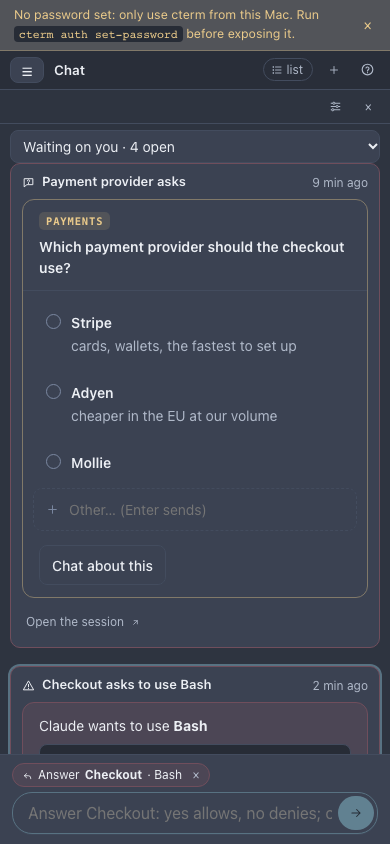
When one of your sessions stops to ask you something and nobody answers it within a few seconds, a card comes to the chat: in Everything, in that session's conversation, and in Waiting on you, a conversation that shows while anything waits. It says which session and project asks and what, with the same buttons as the session's own card:
- a permission: what Claude wants to run or write, with Allow, Allow and remember (when Claude Code offers a rule to remember) and Deny;
- a question: its options (a tap answers a single question), your own answer in Other…, Submit for several, and Chat about this;
- a plan: the plan itself, Approve, Approve and auto-accept edits, and Revise with what should change;
- an entry of the queue: what was prepared and why, with Approve, Changes… and Bin….
You can also answer the newest card with the box, by writing or by voice: while the conversation's newest message is
a card that waits, the box shows Answer <session> and its placeholder says how your words are read. yes,
ok, sí, vale or adelante allow a permission or approve a plan or an entry, no denies; for a
question, an option's name or number picks it (several by commas when it takes several, one line each when the card
asks several questions). Other words count as your answer: a question's own answer, a permission denied with them as
the reason Claude reads, a plan sent back with them as the changes, an entry's changes. Press the chip's × (or
Esc) to write to cterm instead. With the microphone, the transcript lands in the box: read it, then send.
Once answered, here or anywhere else (the session's pane, the dock, the master view, its terminal), the card folds to one line saying what was chosen and by whom: "Allowed by alex from the chat", "Answered: Adyen in the terminal". A session that ends with a card open says so, and after a restart of cterm the open permission, question and plan cards say to answer in the session's terminal, which asks there then.
What do I have pending? Ask it in your own words ("qué tengo pendiente?", "what's pending?", "anything waiting for me?") and cterm answers at once with no model call: every open card, newest first, each answerable in place, and the sessions waiting on you with no card, such as one that ended its turn with a question.
chat-waits-shot.mjsAnswer the queue
Sessions working on their own sometimes prepare something only you should let go: a letter, a message, a posting to apply to, a decision they will not take alone. By cterm's default rules they put it in the project's queue instead of sending it, and wait. You answer it:
- on the project page's Now strip, first after the cards waiting,
- in the Waiting for a yes panel of the master view,
- from a push notification, "Waiting for your yes in <project>", which opens the project page,
- in the chat, where each waiting entry is a card (above).
Each entry shows its kind, what it is, why it needs you, the session waiting and the file, which opens in the viewer. Press Approve (or approve with a note), Changes… (say what to change) or Bin… (say why). Your answer is typed into the session that asked, which goes on, makes the changes and queues it again, or stops. Only the session's owner answers; an admin sees the queue read-only, and an entry is answered once. An approval step of a workflow waits in the same queue, from the workflow and its step rather than a session, with Approve and Bin… only: a bin stops the run at that step.
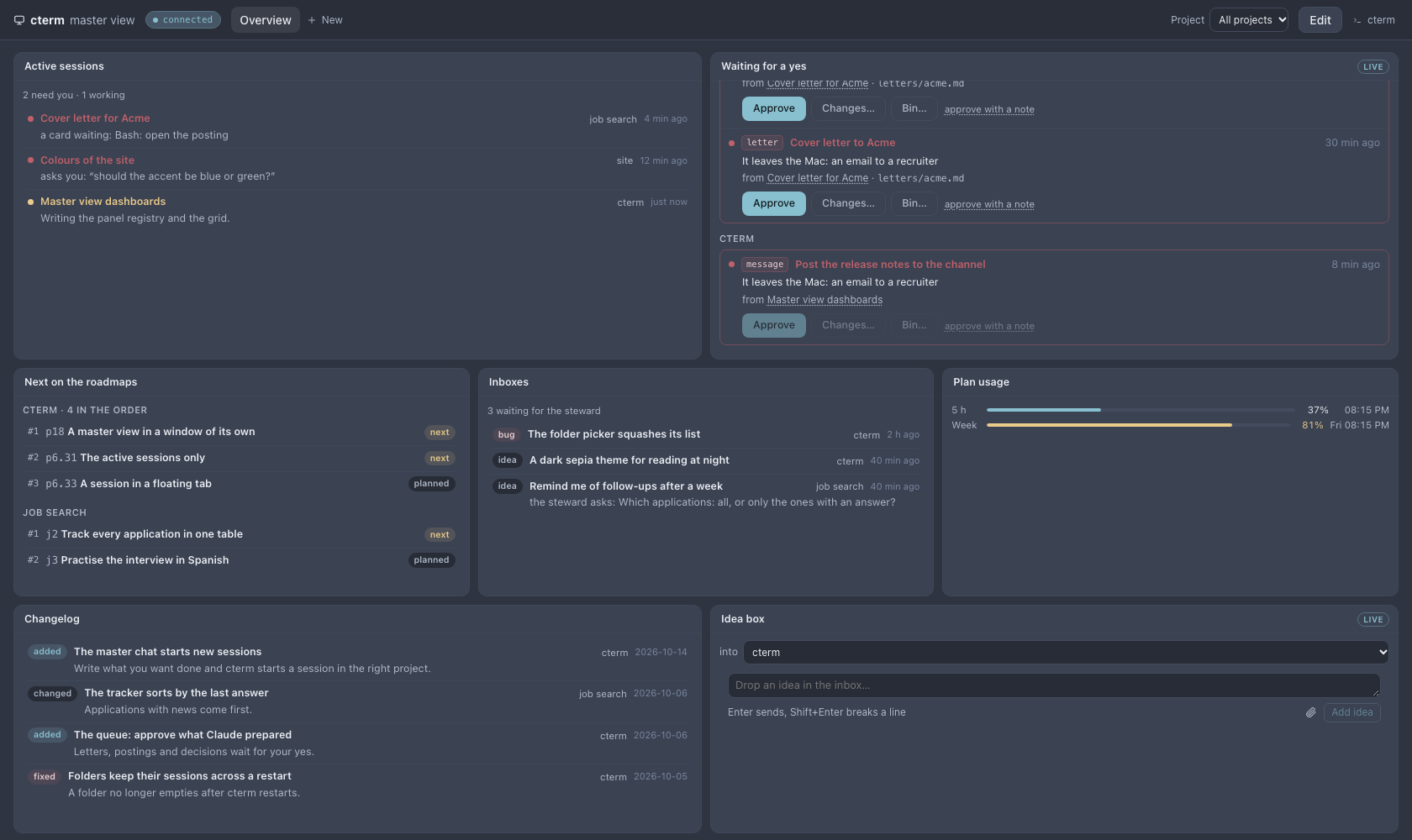
master-shot.mjsA session fills the queue from its own shell with cterm queue:
cterm queue add "Cover letter for Acme" --why "It leaves the Mac: an email to a recruiter" --file letters/acme.md --kind letter
cterm queue list
cterm queue drop q-12 --why "Sent by hand"
How it works
The chat belongs to your account, across your projects, and only ever sees and acts on your own sessions and
projects; messages are kept in cterm's store, never in a project's files. Each message is one claude -p call with
no tools, given your recent sessions, your projects with their open items, inboxes and queues, and the last few
messages, and asked for one decision in a fixed shape, which cterm checks before acting (master-chat.ts).
A message for a session is delivered the way the prompt box delivers one: typed once the session takes keys, queued by Claude Code while it works, the session resumed if it had ended. Its first line tells the session who wrote it and that its answer goes back to the chat; the Stop hook at the end of that turn brings the answer. Ideas are filed as yours with the same checks as the idea palette; questions open a new Ask topic of that project, and a follow-up of one goes on in that topic. The last few messages the dispatcher reads carry the start of their answers, so "it" and "that" find what was said; the chat's own answers get the same room as a session's. Those messages are numbered, and a send that follows one of them names it, so the session typed into gets that exchange under the first line when it was not part of it.
A message asked of several sessions is one message with a watch per session (chat-fanout.ts): each session's turn
that read it is that session's answer, written on its row as it ends, and a timer closes the card at its deadline. A
daemon restart keeps the rows already typed and the deadline; a row cut while it was being typed fails with why.
Queue entries are rows in cterm's store per project; answered ones go after 30 days. The verdict is typed into the
session with a first line naming the entry, and kept whatever happens to the delivery (queue.ts).
The cards of what waits on you follow the session's own events (chat-waits.ts): a permission request cterm holds,
a question or plan dialog it watches on the terminal's screen, a queue entry. A card answers through the very path
the session's card uses, as your account, so a session that is not yours to drive refuses it; the words in the box
are read against the card in cterm itself, never by a model.
Scenarios
Three thoughts in a row
On the train you write "the wiki should keep the drafts out", "use a honeypot on the contact form" and "a sepia theme would be nice". The first is ambiguous and the card asks; you tap the session. The second goes to the session building the contact form, whose answer arrives ten minutes later. The third is filed as an idea and shows its id.
Start something from the phone
You write "add a CSV export to the reports page". No session works on reports, so the chat starts a new one in that project with the task spelled out, and its first answer, a plan and a question, appears on the card. You press Reply on that card and answer the question, which goes straight to the new session.
A letter waiting for a yes
A session drafting job applications queues a cover letter. Your phone shows "Waiting for your yes". You open the file, press Changes…, write "shorter, and name the role", and the session revises it and queues it again.
Answering on the way
Three sessions run while you are out. Your phone's chat shows Waiting on you · 3: a permission to run the tests (you tap Allow), a question about which payment provider (you say "Adyen" into the microphone and send), and a cover letter in the queue (you write "shorter" and it goes back as changes). Each card folds to what you chose, and the sessions go on.
Related
- The master view: dashboards in a window of their own, with the queue, a session's chat and the master chat as panels.
- The roadmap and ideas: the inbox and the Ask tab the chat files into.
- The steward: what happens to an idea after the chat files it.
- The project page: the Now strip where queue entries wait.
- The phone: using the chat and the queue from a small screen.
- Voice input: dictating into the chat's box.