
Sharing
cterm can show a session to someone who has no account. A share link opens one session in their browser, either to watch it live or to drive it: type prompts and answer Claude's cards. A chat on another page is a small chat box you paste into a website or put beside an artifact. Visitors ask questions about the session's work or the page, and each one gets an answer of their own.
What it is for
- Show work in progress. A client, a colleague or a teacher follows a session as it happens, with no account and nothing to install.
- Hand over the wheel for a while. Someone you trust types the next prompts and answers Claude's questions, while you keep the permission prompts or let them answer those too.
- Answer questions about a page. A report or demo you published as an artifact, or a page of your own site, gets a chat that answers from what it shows. Visitors never touch your session.
How to use it
Sharing belongs to admins. You can share your own Claude sessions, and your Codex and Gemini sessions (Codex and Gemini sessions). You can't share someone else's session or a shell, and a user account doesn't share at all.
Make a share link
- Open the session and click Share in its head. On a phone it's under More.
- Pick Watch only (the conversation, live, with no prompt box and no answers) or Watch and drive (the viewer can also type prompts and answer Claude's questions and plans).
- Choose when it Ends. A watch link can have No end, An hour, A day or A week. A driving link always ends, after an hour by default.
- For a driving link, decide on Let it approve tool use. Without the tick, Claude's permission prompts stay yours: the viewer sees them but can't answer. With it, the viewer can allow a tool use once at a time (never "remember"), and can approve a plan with auto-accepted edits.
- Read the warning, then click Make a watch link or Make a driving link.
- Click Copy and send the link. It's shown only this once: cterm keeps no copy of it, only a way to recognise it.
When the session runs in a mode that never asks for permission (an admin's sessions start that way), you can still pick Watch and drive. The popover then leaves out the approve tick, since nothing is ever asked, and its warning turns stricter: whatever the viewer asks for runs on this Mac as your user without asking you first. Prompts still have to be plain text. Only send such a link to someone you trust.
What the viewer sees
The link opens a page of its own, always in the light theme. It shows the session's name and state at the top and the conversation below, followed live. The tool calls are left out. A watcher has no prompt box and no buttons.
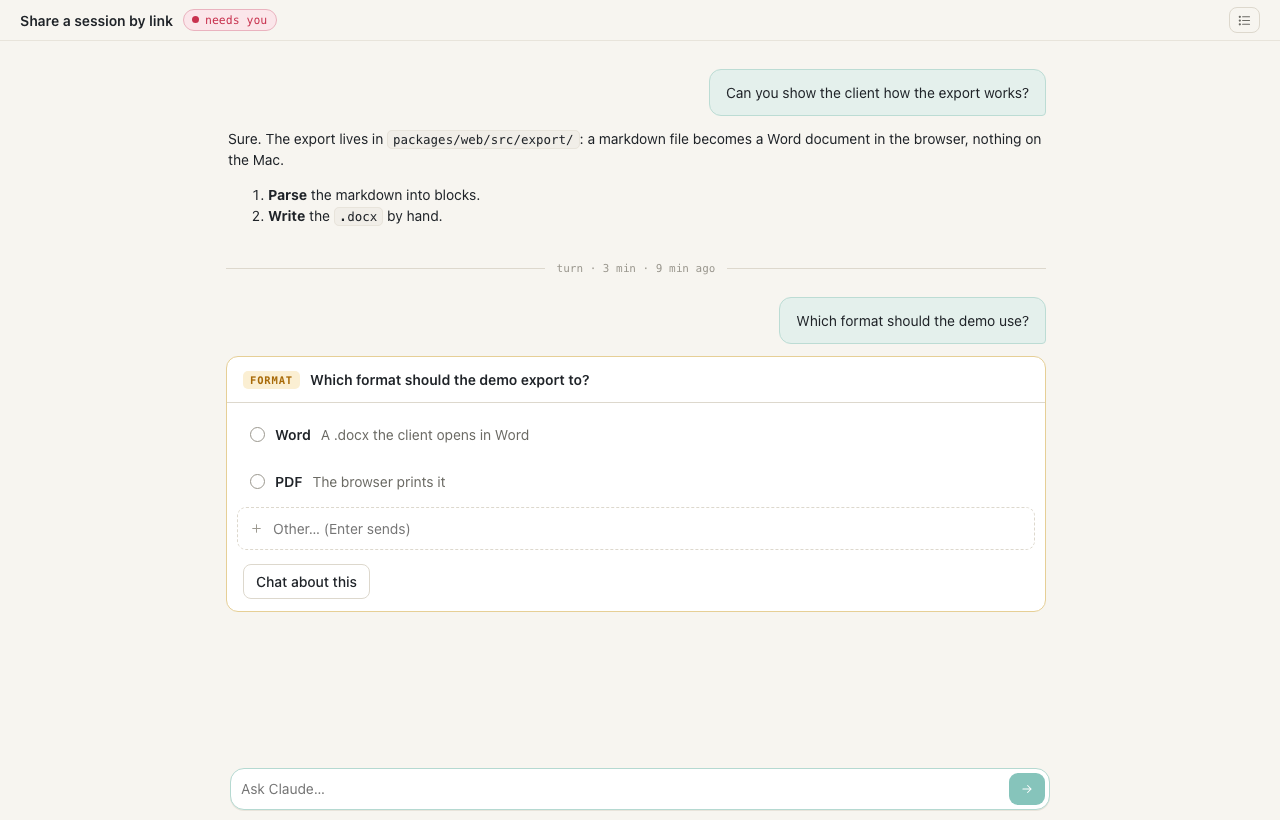
A driving link adds a prompt box ("Ask Claude…") and the buttons on Claude's question and plan cards. It also has Stop (a square), which interrupts the turn, and its arrow button reads Resume in place of Send (in its tooltip) when the session has ended. Like the owner's box, it is one line high until the text needs more. Prompts are plain text only: a prompt starting with / or ! stays in the box with a note, because Claude Code would read it as a command. A permission card the viewer may not answer says only the owner can.
The page reaches nothing else of cterm: no session list, no files drawer, no comments, no other session. File paths in the chat are plain text. A viewer's window never resizes your terminal. When a link is revoked, expires or loses its session, the open page says "This link has ended" within seconds.
share-shot.mjsWhat else the viewer can open
A Claude session's page also shows some of what you see beside the chat, read-only, the same for a watch link and a driving link:
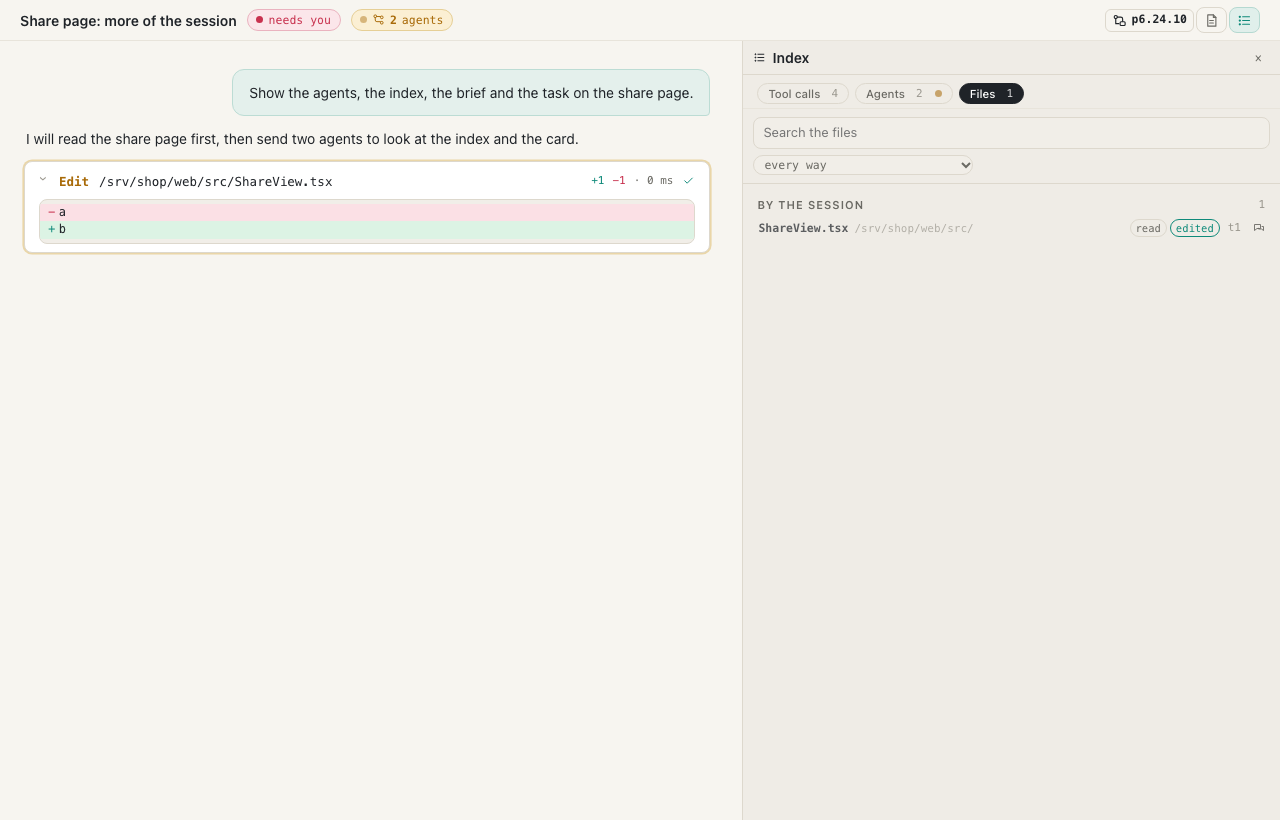
- The agents chip in the head while the session runs agents: the count, and a list of each agent with its type and description. A row scrolls the conversation to that agent. Once none runs, a quiet chip says how many the session ran and opens the index on its Agents tab.
- Index (the list icon, once the session has made a tool call): its Tool calls, Agents and Files, as in your own index but without Comments. A row shows its call in the conversation, even though the page hides tool cards otherwise. The Files tab lists what the session read, wrote or edited, and opens none of them.
- Brief (the page icon), only while you keep a brief of the session. The viewer reads it as you do, follows it as it updates, and can't switch it on, off or update it. When you switch it off, the button goes from their page.
- Task, when the session works on a roadmap item: the item's id in the head opens its card alone in a dialog, with its title, status, summary, To build, Done when, decisions, notes and log. There is no pencil, no Start, no model, no link to another item or session, and no way to the roadmap itself. Esc or a click beside it closes it.
A Codex or Gemini session's page has none of these, and a session with no tool call, brief or item has the plain head.
share-shot.mjs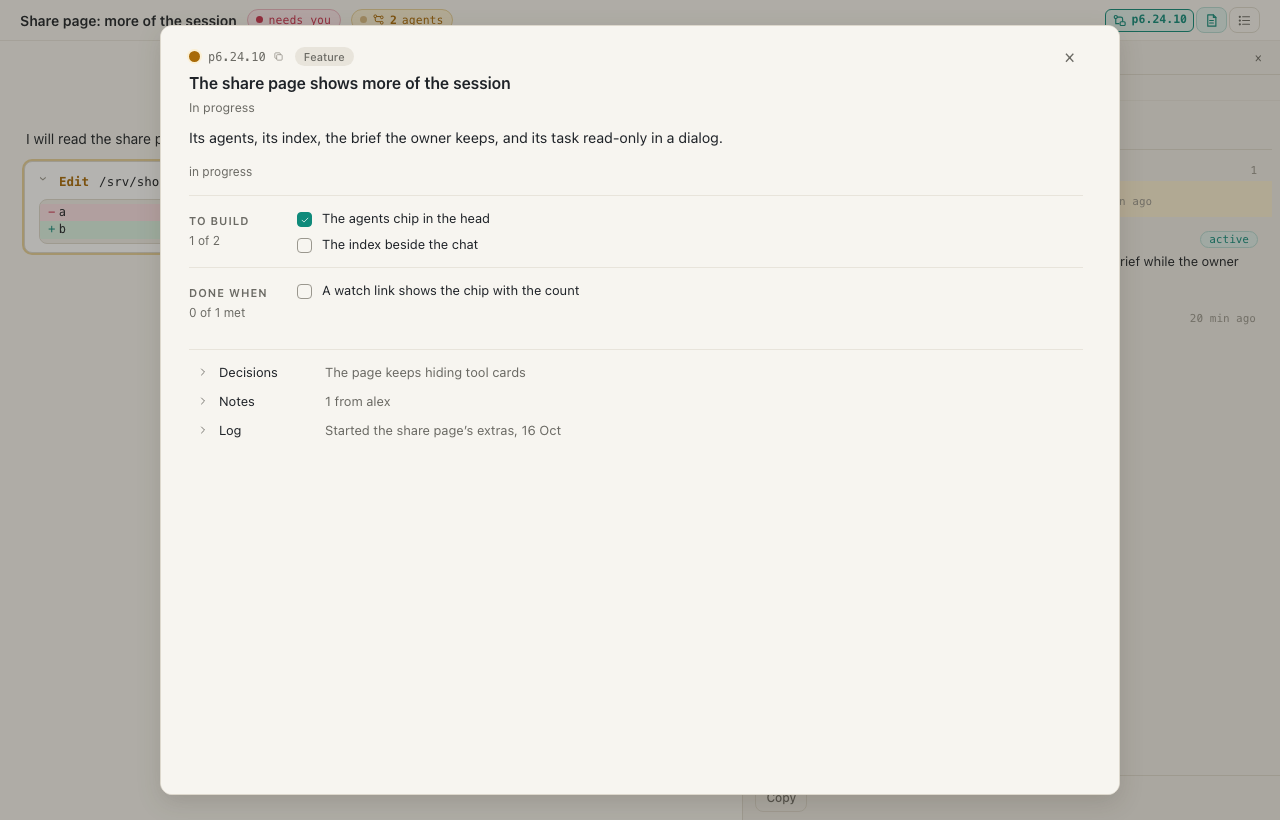
share-shot.mjsEnd a link, and read the marks
- The popover lists the links that still work, this session's first and then the Other sessions of this project. Each row shows its level (watch, drive or drive + approve), when it was made, when it ends and who made it. Revoke ends a link at once and closes any page open on it.
- A shared session carries a mark that only you, its owner, can see: the share icon after its name in the list, and a chip among the head's marks. It's red ("driving link") while a driving link works, the accent colour ("shared") for watch links only, and gray ("link ended") once every link has ended. The tooltip says which links there are and when the last one ends.
- A gray mark stays until you open Share and click Clear next to "links to this session have ended".
- The session finder's shared chip lists the sessions you have shared.
Put a chat on another page
- For a session, open Share and scroll to Chat on another page. For an artifact (a page), click Chat on its head in the Artifacts panel.
- Fill in the form:
- Sites that may show it: one address per line, like
https://example.com. An artifact's own link may always show its chat. - Title of the box.
- Let it read the project's files: read-only.
.envfiles, keys and.gitalways stay out. - Answers on: Sonnet by default, Haiku or Opus.
- Ends: Until revoked, 30 days, A week or A day.
- Questions a day, for all visitors together (200 by default), and …per visitor's address (20 by default).
- Sites that may show it: one address per line, like
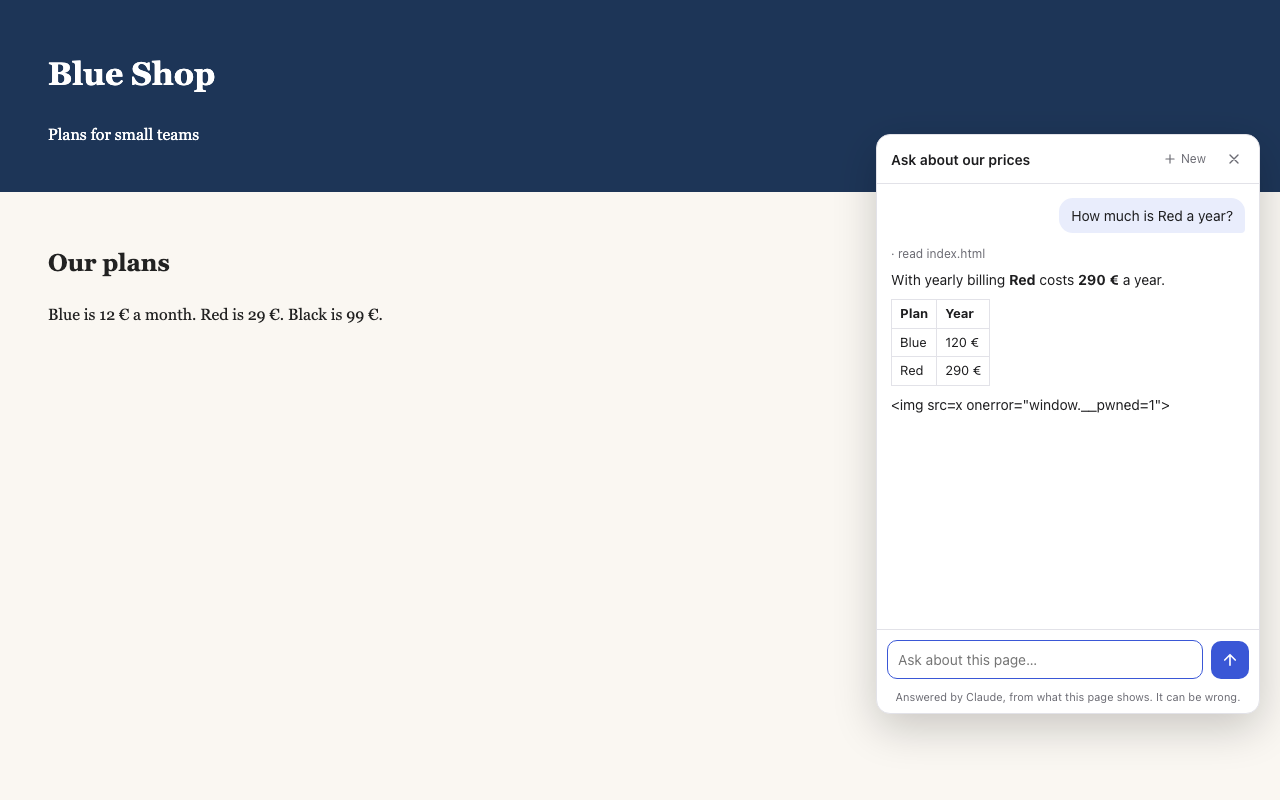
- Click Make the chat, then Copy the tag and paste it into the page's HTML. For an artifact, its link already shows the chat beside the page.
Each chat's row shows its sites, its end, today's counts and when the last question came. What was asked lists every conversation with its time, address, site and browser, and the questions and answers. Revoke stops the chat on every page; the pages themselves stay. + Another chat makes a second one with other settings. The Share popover also lists the project's other chats under Chats on other pages.
embed-shot.mjsHow it works
A share link is a row in cterm's store (shares.ts): its session, its level, who made it and when it ends. The secret in the link is 32 random bytes, and only their hash is stored, so neither the store nor a backup holds a working link. The page at /share/<token> connects with that token instead of a sign-in cookie. Its connection belongs to no account. It receives only its own session's events, and the daemon checks every message it sends against what the level allows (shareRefusal in permissions.ts): never a close, a model change, a command or another session. It may read its session's brief, which the daemon answers only while you keep it on and without its model or errors, and its session's roadmap item, which the daemon hands over alone (share-item.ts): no tree, no inbox, no other item, no session links. Every change to either is refused. What a driving link does, it does as you. The connection is checked again every 15 seconds, which is how an ended link closes its page. Each opening is recorded in the store with its address and browser.
A chat on another page never reaches your session. Each question is one claude -p run on your Claude login, with no saved conversation. It gets the page's text, or the session's conversation as a digest without the tool calls, plus that visitor's conversation so far. It runs restricted in an empty folder, with only reading tools, on the artifact's copy and the project's folder when you allowed it. Questions are plain text up to 2000 characters, 40 per conversation, one answer at a time. The tag loads embed.js from cterm, which draws a corner button and the box. The box draws nothing on a site you didn't name, or once the chat has ended. The key in the tag is limited by the sites, the daily limits, the end and Revoke. A site that wants to draw its own chat can call the HTTP API described in the repository's docs/embed-api.md. Conversations are kept for 90 days.
Scenarios
A demo for a client
You make a watch link with no end for a client, who follows the session from their laptop: your prompts, Claude's answers and its questions, but not the tool calls, your files or your other sessions. The session works on a roadmap item, so the client opens Task to read what it is meant to build, and Brief for where it stands. When the project ends you click Revoke, and their tab says the link has ended.
A colleague takes over for the afternoon
You are going out and a colleague will carry on. The session runs in the default mode, so you make a driving link that ends in A day, without Let it approve tool use. They type prompts and pick answers on Claude's question cards. When Claude wants to run a command, the permission card waits, and you answer it from your phone. The head's red driving link chip reminds you the link is live until you revoke it.
Questions about a published report
A session published a pricing report as an artifact. You click Chat on it, keep Sonnet, set 30 days and make the chat. The report's link now shows the chat beside the page. A week later, What was asked shows which questions people asked, and that one visitor reached the daily limit.
Related
- Codex and Gemini sessions: sharing a Codex session, whose page shows its terminal.
- Remote access: the public address a link needs to work outside the Mac.
- Artifacts: the published pages a chat can sit beside.
- Sessions and the rich pane: the cards a driving link can answer.
- cterm on a phone: Share under the head's More menu.