
The steward
The steward is the part of cterm that looks after a project's roadmap while you work. It is not a session you open: it is a series of short background jobs, each a Claude run in the project folder, started by cterm when something needs judgement: ideas arrive, or a task session ends. Each job reads the part of the roadmap it needs, does its part, writes the result back and stops. What needs no judgement cterm writes itself, at once and without a model: a task session's start, and a merge once the session's outcome is recorded.
What it is for
- Ideas placed without your attention. Whatever lands in the inbox, from the palette, the chat or
cterm
idea
, becomes an item under the right parent, an update of the item that already covers it, a note on an existing item, a later idea, or is dropped with a reason. Every triage starts from the titles of the whole roadmap, reads in full the items an idea may touch before it writes anything, and links the new item to them (its Related items); when an idea would go against what an item decided, or change what another item does, it does not place it but asks you, with the options and what each would change. The inbox card says which items it read before it decided. A new item is written ready to build: the problem and the solution, what to build, the conditions that say it is done and what it leaves out (see What makes an item ready to build). Each idea gets an opinion and a value score from 1 (marginal) to 5 (essential). Bug reports go onto the item they concern, reopening a done one when it is not done after all. A break noted on a done item comes with its suspects, the merges since it was built that touched its files (see When a done item breaks again), and the steward starts from them, putting the fix on the suspect's item when one plainly caused it. - A record of what sessions did. When a task or define session ends, a job reads its transcript and writes the
log entry with the commits and the items touched, ticks the item's acceptance criteria the work met (and says
which were not), folds the session's notes into the item, sets the status, and
adds a changelog entry when readers of the project would notice the change. For a task session in a worktree, the
commits it names are read from the session's branch, merges of main included, so a commit reworded with
--amendappears as it is now and one made quietly is not left out. - An order of what comes next. After each triage and each outcome the steward ranks the planned items, so the roadmap always says what to start next and why.
- Starts and merges written as they happen. When a task session starts in its worktree, cterm sets its item in progress, notes the start on it (signed steward) and makes the ranked items that touch the same files wait for it. When a branch is merged after its session's outcome was recorded, cterm notes the merge commit, the pull request, how the project's before-merge tests went and what was rebuilt on the item's latest log entry and in its Built card, and a build that failed after the merge as a note on the item. A merge that comes before the outcome (a session merged by itself at the end of a turn) waits for the outcome's job and goes in it, so the Built card is written once.
- Todays checked against every merge. Before a merge is recorded, cterm marks the open items whose Today names a file or function the merge changed: Today may be stale on their card. The merge's job is told which; it rewrites a Today the merge plainly changed and leaves the others to Still valid?, which the project can run on them by itself (see The roadmap and ideas).
- Interface changes told across a product. In a product, a merge that changes a file of the member's interface globs asks a job to read the other members' code and note each of their open items that uses the file (kind concern), and to file a use no item covers in that member's inbox. When cterm records the merge itself, that part still goes to a job of its own.
- Help pages that follow the app (in cterm's own roadmap). When a task session's branch is merged, cterm looks for pages of this documentation whose part of the app the merge changed while neither the page nor its pictures did, and lists them on one planned item, "Docs catch-up", with the screenshots to redraw, so a task session brings them up to date.
How to use it
You mostly do not: the steward runs by itself in every project whose roadmap is on. What you see and can do sits on the roadmap panel.
Follow its jobs
Under the panel's head a line says what the latest job did ("Steward: Placed 2 ideas under p1 · 3 min ago"), is doing ("Steward: working on triage"), waits for, or why it failed, in red. The end of the line names the model and effort the next job runs on. Click the line to list the last jobs: when each ran, done or failed, the model, the number of calls, its events (triage, a session's start, merge or outcome), its summary, the questions it asked and what became of each inbox row. Money is never shown here.
The items a job worked on are links, like the Log tab's: the item a session's start, merge or outcome concerns sits after the event, a placed inbox row ends with the item it became, and "order:" lists the items the job's ordering pass moved. A click opens the item's card. An id no longer on the roadmap (folded into another, or removed) stays plain text, and jobs recorded before cterm kept the item show their events without one.
- Triage now on the inbox runs a job at once instead of waiting.
- Run again on a failed job runs its events again, with whatever the inbox holds.
Both are for the owner or an admin. A failure also shows in the project page's Now strip, with a pointer to Run again.
Answer its questions
Nobody is there to answer a job, so when a placement would change the plan or a bug report fits nothing, the steward leaves a question instead of guessing. On an inbox row it shows as asked; the row stays in the inbox until you answer. Open it, read The steward asks with its options, type your reply and press Answer. Your answer is dated and signed, and a new job runs with it. A question about a placed item becomes a line in its Needs. Unanswered questions also show on the project page's Now strip.
Tell it things
A note on an item's card (Add note) is how a fact reaches the steward without a session: it reads the notes whenever it touches the item and turns a settled choice into a decision, a change of plan into the item's text, and something only you can provide into a need. It leaves the notes themselves as the item's history. To ask a question about the roadmap, use the panel's Ask tab (see The roadmap and ideas) or the master chat; both run separately from the steward.
Steer the order
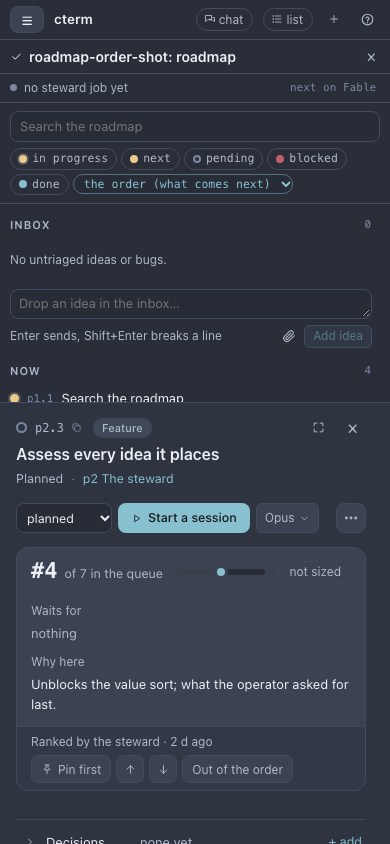
Choose the order (what comes next) in the panel's sort select to see the ranked items, each with a #n chip
and the steward's reason. On a card, the queue section shows the rank, the size (S, M or L), what it waits for,
what it blocks, the files or areas it touches and Why here. The owner or an admin can:
- Pin first: put the item at the top. The steward ranks around pinned items and never moves them.
- Unpin, Move up, Move down, Out of the order, or Add last for an item not in the order.
- Drag one row onto another in the order list to take its place.
The steward weighs, in this order: your pins; what is broken before what is new; what unblocks other items; what
you value most and filed most recently; small before large; and nothing that touches the same files as work in
progress. The first two unblocked ranked items get the status next. On a product's roadmap, a file names its
member as a prefix (api:src/routes/users.ts), so the same path in two repositories is two files, and work that
changes two members is split into one child per project, the later waiting for the earlier.
Pick its model
In the project page's Settings tab, Models & effort, the Steward on row sets the model and effort of
this project's jobs. Left empty, they use the default for every project, set with cterm steward model <alias> and
cterm steward effort <level> (cterm steward status shows them), and otherwise the project's thinking model.
Beside the row, the last exam's score says how well the steward decided on the model it was examined on (see
below), so you read it before you pick a cheaper one.
Examine a change to its prompts or model
Before you move the steward to another model, or change its prompts, run its exam: past jobs are run again with the change, and you see which decisions would come out differently and what it costs.
- Keep some past jobs as the exam set, once:
cterm steward exam add --last 20, run from the project folder (or with--folder <dir>). For each job it works out what finally stood after it: where each inbox row went (the item that keeps the idea now, even when you moved it since), its value, its rank right after the job, and for a start or an outcome the items it touched and their status. It prints that answer so you can check it; give the right one withcterm steward exam add <job id> --expect '<json>'.cterm steward exam jobslists the folder's last jobs,listthe set,remove <case>takes one out,exportandimportcarry the set as JSON. - Run it:
cterm steward exam --model sonnet --effort medium(each job's own model by default;--prompt <file>runs a brief of yours instead of this build's,--keptthe brief and prompt each job ran,--only 3,7some cases,--drybuilds everything and runs no model). Run from a worktree, it uses that worktree's prompts: that is how a change to them is examined before it merges. - Read the lines: per job, holds or changed, the model, what the replay cost against what the job cost, and a check per row or item (✓ or ✗ with what was expected). A placement holds on the same item, or a new item under the same parent; a value within one; a rank within three. The last line says how many hold and the total cost.
A replay writes nothing to the repo or to cterm's store, only the score beside the steward's model: it runs in a scratch clone of the repo at the job's commit, with no remote, the inbox rows and notes the job was given, and no way to reach the daemon. Each replay is a real Claude run on the project's login, so twenty of them cost about what twenty jobs did on the model you pick.
roadmap-order-shot.mjsHow it works
Each event goes into a queue per project folder. Ideas wait a minute after the last one arrives, so a burst becomes
one triage; an outcome waits a few seconds, and a merge whose outcome is not recorded yet never starts a job of its
own: it waits for the outcome and goes in the same job (the list shows it waiting meanwhile). One job runs at a time per folder and at most two across cterm. A product's members share one queue, the anchor's: every member's events go there, each job runs in the anchor's folder with the other members given to it with --add-dir, and one triage takes every member's inbox, naming on each item the projects it touches and putting a bug on the project where its cause is (across a product). After each job, and when the daemon starts,
cterm looks again and runs a job if the inbox still holds rows nobody is waiting on.
A job is claude -p in the project folder on the project's Claude login, with the steward's brief appended to the
system prompt and the batch of events as the prompt. A job on one item, an outcome, begins with show --around
<id>: the roadmap's head, the item in full, its parents and siblings, what it waits for and what waits for it, the
order near it and its latest log entries, about an eighth of the whole overview, which a triage still reads. It answers with a fixed shape: a summary, its commits, the
questions it left and what it could not do. It has a turn cap and a 20-minute limit; a failure is retried once
after five minutes, then waits for Run again, with nothing lost, since the inbox and the outcome stay where they
were. When the plan's usage limit is reached on its model, it falls back to the project's executing model. The last
jobs are kept in cterm's store (steward-job.ts, steward.ts), each with what it was handed: the roadmap's commit,
the brief and prompt it ran, and for a triage the inbox rows and session notes as they were, which leave the inbox
once placed. That is what the exam replays (steward-exam.ts); a job from before this was kept is read
afterwards, its commit found by its start time and its prompts as its events hold them.
What it may do:
- Read the roadmap, the log, the code (often through subagents) and a finished session's transcript.
- Write the roadmap, the log and the changelog, only through the roadmap skill's script, never by editing the files.
- Commit its own roadmap-only changes once, at the end of the job, with a subject starting
Roadmap:, and push them, when the roadmap is in the repo. When it is kept in cterm, nothing is committed.
What cterm writes itself, a start or a merge, goes through the same script, and is committed a few seconds after
the last of a burst, in one Roadmap: commit; while a job of the folder runs, the commit waits for it
(steward-record.ts).
What it may not do: start the work an idea describes, edit code, or decide what changes the plan without asking. These are rules in its brief, which the model follows; it runs without anyone to approve permission prompts, as the owner's other background jobs do, and a user's project keeps it to that user's folders.
Scenarios
A morning of ideas
You drop five ideas from your phone before breakfast. A minute after the last one, a single triage runs: three become items with value scores, one is folded into an existing item, and one is asked about because it could go under two phases. You answer "the second" from its card; the next job places it.
A finished task session
A task session ends after merging its work. Within seconds a job reads its transcript, writes the log entry naming the commits, ticks the scope lines it built, sets the item done, adds a changelog entry, and moves the next unblocked item up to next.
Changing priorities
A client call makes one item urgent. You open its card and press Pin first. The next triage leaves it at the top and ranks everything else behind it, saying in the log what moved and why.
Related
- The roadmap and ideas: the items, the inbox and the panel the steward keeps.
- Task sessions and worktrees: the sessions whose start, merge and outcome the steward records.
- The project page: the Now strip with failures and questions, and the Settings tab.
- The master chat and decision mode: another way to file ideas and ask about the plan.