
Task sessions and worktrees
A task session is a Claude session started on a roadmap item. It begins already briefed on the item, starts on it without you typing a prompt, and reports what it did back to the roadmap. With worktrees on, each task session works in its own git worktree and branch, so several can run side by side, and you merge each one into main with a button when it is done.
What it is for
- Work that starts from the plan. The item's text, decisions, needs, notes and recent log entries become the session's brief, so you do not paste context by hand, and the roadmap learns what the session did.
- Parallel work without collisions. A worktree per task keeps one session's half-finished edits out of another's tree and out of main until you decide.
- Merging without a terminal. Claude Code does not let a worktree session touch the main checkout, so cterm merges for you, handles the push or the pull request, and runs what the project needs after a merge.
How to use it
Start a session on an item
- Open the item's card in the roadmap panel, or the task chip in a session's head.
- Check the model button beside Start a session (it shows the model the session will start on).
- Press Start a session. Only the project's owner can.
cterm starts a Claude session in the project folder, listed in the sidebar under the item's id and title. You stay where you were: the card, the roadmap panel or its full view, the project page's Roadmap tab, the task popover, and on a phone the roadmap page. A toast at the top says the session started, with Open, which takes you to it (Back returns to the roadmap on the item), so you can start the next item's session straight away; starts in a row stack one toast each.
One task session works on an item at a time, since it has the item's worktree and branch to itself. While a start is on its way the button reads Starting… and takes no second click, and once the session runs, Start a session gives way to Open session. If a start still reaches an item that has a session at work (from another tab or device), cterm starts nothing and opens that session instead, with a line saying so. Define this works the same way for the item's define session.
When cterm has merged an item's task session but the steward has not recorded it yet, the card says so in a line, Merged as 8492d90 at 17:59: the steward is recording it, until the item turns done. Start a session there, or on an item that is done, asks first, naming the merge, and starts nothing on Back: a new session would only find the work already on main.
As soon as Claude's input box is ready, cterm types the first prompt: start on the item, set it in progress, do the work, record and commit. If that prompt never lands, a bar at the foot of the pane offers Send the kickoff.
To talk an item through before anyone builds it, use Define this in the card's ⋯ menu: a define session discusses it with you, reads the code and writes the outcome into the item, and builds nothing. Link the open session ties a session you already have to the item.
Back in the session, the item's id sits in the head beside the Roadmap button. Click it to slide the item's card in from the right (a bottom sheet on a phone), edit it there, or go to Open in the roadmap.
Pick the model for an item
The model button on the card opens Task sessions on <item>:
- Work: the project's choice, Plan + execute (the session plans on the thinking model and hands each step to an executor subagent) or Execute directly.
- Complexity S, M or L, which picks the project's preset models where nothing else is chosen.
- The model (Project's choice, Fable, Opus, Sonnet, Haiku), the Effort, and the Executor when planning.
- A line saying what the project gives, with Change in project settings.
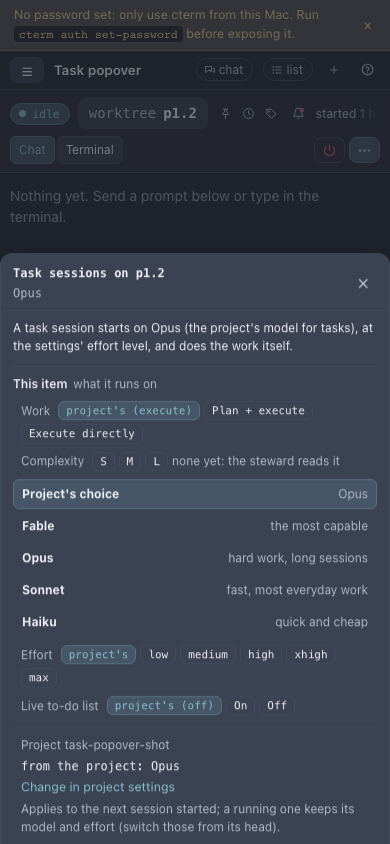
task-popover-shot.mjsA pick applies to the next session started on the item; a running session keeps its model until you change it from its own head.
Turn worktrees on
In the project page's Settings tab, section Task sessions, switch on Task sessions in a worktree of their
own. A task session then runs in .claude/worktrees/<item> on the branch worktree-<item>. Claude Code only
makes worktrees in a folder it has trusted, so if it refuses, start one plain session in the project first.
The session's head shows a worktree chip with the item's id. The session commits on its branch and pushes only that branch; it never writes the roadmap file, which is updated on main. As soon as its first prompt lands, cterm itself sets the item in progress, notes the start on it and makes the ranked items that would touch the same files wait for it: no model is involved, so the card reads in progress within seconds.
Merge from the app
Click the worktree chip to open its popover: the branch, how far it is ahead of main, uncommitted files, whether a session still works there, and whether merging it now would conflict with main, with the files. Then:
- Merge into main runs the merge in the project folder and pushes main. It is refused, with the reason, while a session in the worktree is still working.
- Close and clean up ends the session (it stays resumable) and removes the worktree and its branch once main holds every commit.
- Remove worktree and Refresh do what they say.
The same Merge into main appears on the session's row in the item card's Sessions list. The owner or an
admin merges. From a terminal: cterm worktree list|merge|remove <owner>/<project> [<item>].
If main has moved and the merge conflicts, cterm aborts it at once, leaves main clean, and tells the session to merge main into its branch and resolve the conflicts there; the popover shows the merge waiting, with cancel.
You rarely get that far: cterm tries every live session's branch against main while the session still works, every few minutes and right after each merge into main, without touching either branch. When a merge would conflict, the worktree chip reads conflicts (its tooltip names the files), the project page's Now strip gives it a line, and the session is asked, once its turn is over, to merge main into its branch and resolve those files. It is asked once for each set of files, and the chip clears once the branch merges clean again. A merged session shows a merge mark in the sidebar, its prompt box turns read-only, and Resume anyway in the row menu reopens it if you really need to.
Work through pull requests
Switch on Work through pull requests in the same section. Sessions are then told to work on a branch and open
a pull request, never to commit to main. The popover's button becomes Merge the pull request: cterm merges it
on GitHub with gh and brings the main checkout up to date. cterm also follows each pull request on GitHub (its
state, review and checks, a merge or close made there) about once a minute; the line under the switch says when it
last read GitHub, or why it cannot, with Read now. The head's commits chip reads like "4 commits · PR #42",
coloured when a review asks for changes or checks fail.
With the switch off, a pull request a session opened anyway still follows GitHub: cterm reads just those pull requests, by number, so one merged or closed on GitHub stops reading open, with its review and checks shown the same way. Nothing else of the switch happens then: no merge follow-up, no notification, and no pull request of the repository listed unless a session opened it.
Before a merge: the project's tests
Before a merge (the Settings tab's Task sessions section, or cterm project set <owner>/<project> before-merge
"<command>") is a shell command, usually the project's tests, such as npm run typecheck && npm test. cterm runs
it in the session's worktree before every merge of that session, and the popover says it is running. When it
passes, the merge goes on as usual and the popover keeps the run under the result: the command, how long it took.
When it fails, nothing is merged.
A red run is shown by what failed first: cterm reads the whole output for the lines that name the failing tests (each failing test with its error, the totals of a suite that failed, a type error), then adds the run's last lines. When the tests run in several suites one after the other, the failing test may sit far above the end, under the next suite's green summary; the failing lines still come first. The same lines go to the daemon's log.
- A merge cterm makes by itself (Merge a finished session by itself) types what failed and the last lines to the session and asks it to fix them. The session's next finished turn runs the command again, and the merge goes through once it passes. After three red runs the session is left to you with a notification.
- Your own Merge into main shows the failed run with its output unfolded and Merge anyway…, which asks
first with the failing lines in view. The red run stays with the session until a run passes or the branch is
merged, so the popover shows it again when you open it later, after a reload or a restart of cterm. Merging
anyway keeps the red run and your name on the merge's result, and the steward notes it when it records the
merge. From a terminal,
cterm worktree mergeruns the command too, prints what failed and stops on a red run unless you add--anyway.
If the Mac went to sleep while the tests ran, timeouts in them can run out in the dark. A red run that slept (a timer that fired far too late, or a run far longer than the last one that passed) is run once more before it counts, and the run's line says "run again: the Mac slept through the first run".
Left empty, a session is merged with nothing run first.
After a merge
- After a merge: a shell command run in the project folder after each clean merge, such as
npm run build. Its output is kept with the merge's result in the popover. - Clean up after a merge: closes a merged session once its turn is over and removes its worktree and branch.
- Merge a finished session by itself: Never, A bug's session or Every task session. When a covered session ends a turn with its work committed, a clean tree and no question for you, cterm merges it, closes it and cleans up; otherwise it leaves it to you with a notification. While something still holds it (an agent running, a prompt waiting in Claude's queue, a retry), it waits, and merges once that clears, with or without another turn.
- Start a session on each bug: once the steward places a bug report as a new bug item, cterm starts a task
session on it by itself. An idea or a bug report filed with Build it once placed does the same for that one
item, with this setting off too (a report noted onto an existing item starts on that item). Both need
worktrees, run at most two at once, and wait while the plan's usage window is past 80%. A start also waits while
another session works on the same files: the files the steward named for that session's item, and the ones its
worktree has changed so far, committed or not. It goes ahead once that session ends. It also waits while a live
session's branch conflicts with main (or with the item's own branch, when an earlier session left one): one of the
two merges would meet that conflict, so the start waits until the live session has merged main and resolved it.
The held line names the files. In a project that is part of a product, the two at once, the session already on
the item and the shared files count every member's sessions, and a file is compared with the member it is in
(
api:src/routes/users.ts); a branch's conflicts are still read in its own repository.
Check an item is still worth building
Before you spend a session on an old planned item, pick Still valid? in the card's ⋯ menu (owner or admin). A background check reads the item against the code, the done items and the log, and returns a verdict (still valid, already built, superseded, premise gone or partly built) with its reasons and commits. Then one click: Mark done, Keep or Drop. It is refused for an item in progress, done, dropped or still an idea. An item whose Today names code that a merge changed says Today may be stale on its card, which makes it a good candidate for this check. With the project's Check stale Todays after a merge switch on, cterm runs the check itself on the items a merge marked: one at a time, at most five per merge.
How it works
The daemon builds the brief from the roadmap at every start and resume and passes it with
--append-system-prompt, so it always says what the file says now. A worktree session is started with Claude
Code's own --worktree <item> flag, which makes or reuses the worktree.
Merges are the daemon's, in the main checkout. The before-merge command runs first with sh -c in the worktree,
as the session's owner would run it, for up to 20 minutes; a run that ends with any exit code other than 0, or runs
out of time, is red. Then git merge --no-ff worktree-<item> and git push, or
gh pr merge and git pull --ff-only with pull requests on, then origin's copy of the branch is deleted once it
is safely on main. Uncommitted changes in main that a merge would overwrite make git refuse, and cterm names the
files rather than stashing anyone's work. When a task session ends, the steward records its outcome
on main from its transcript: the log entry with the commits, the status, and a changelog entry when readers would
notice the change (worktrees.ts, steward-job.ts).
A "Still valid?" check is a read-only claude -p run in the project folder; its verdict is kept as the item's last
check and as a note the steward folds into the item at its next triage.
In a project that is part of a product, a task or define session, a check and an answer to a question about the
roadmap also get the other members' folders with --add-dir, at every start and resume, and the brief names each
with its project, to read only; a change one of them needs becomes a child item naming that project
(across a product).
Scenarios
Three items at once
You switch worktrees on and start sessions on three small items. Each works in its own branch. The first finishes,
you open its worktree chip, press Merge into main, the project's tests pass in its worktree, and the
project's npm run build runs after the merge. The second
conflicts because the first touched the same file; cterm hands the conflict back to that session, which merges
main into its branch, and the merge goes through when it is done.
A team that reviews everything
Your project works through pull requests. A task session opens a pull request, a colleague asks for changes on GitHub, and the commits chip in the session's head turns to the warning colour. After the fixes are approved you press Merge the pull request from your phone, and the main checkout on the Mac follows.
A red run before the merge
Every task session of your project is merged by itself, and Before a merge is npm test. A session finishes a
fix, but one of the project's tests fails on its branch: nothing reaches main. The session gets a prompt that starts
with the failing test and its error, fixes it, commits, and when its turn ends the tests run again, pass, and cterm
merges it. Had the laptop's lid been closed halfway through the run, the tests would have run once more on waking
before anything counted as red.
Pruning the plan
Before planning the week you run Still valid? on the top ranked items. One comes back "already built" by another item last month; you press Mark done and start a session on the next one instead.
Related
- The roadmap and ideas: items, cards and the inbox task sessions start from.
- The steward: records what a task session did and keeps the order of what comes next.
- The project page: the Settings tab with the Task sessions switches.
- Sessions and the rich pane: the session itself, its head and its cards.
- The phone: the task popover and merges from a small screen.