
Voice
Wherever you write to cterm, you can speak instead. A microphone button records what you say, a whisper server turns it into text, Claude tidies the text for what it is meant to be, and the result lands in the box for you to read and send. Nothing is ever sent by itself.

voice-test.mjsWhat it is for
Typing a long prompt on a phone keyboard is slow and error-prone. Voice lets you dictate a prompt, an idea for the roadmap or a message to the master chat while walking, cooking or away from the desk. Because whisper writes down everything, including "um", false starts and corrections, a short model call cleans the text up first, so what you read is close to what you meant.
Practice mode goes further: a spoken conversation with Claude, for rehearsing an interview, practising a language or running through a talk, with feedback on what you said and how.
How to use it
Record a prompt
- Tap the microphone in the prompt box. It turns red and shows a timer.
- Speak. A recording can last up to five minutes; Esc throws it away.
- Tap again to stop. Three dots show while it is transcribed.
- The text continues whatever was already in the box, with the caret at the end. Read it, change what you like, and send it with Enter or the arrow at the box's right.
The button only shows when voice is set up on the Mac and the page can record: the browser allows the microphone
only on localhost or over https, such as the remote address. The first time, the browser asks for permission.
A note under the box tells you when something needs a look:
- An idea: if you said you have an idea for the roadmap, the note says so and points you to the idea button (the light bulb in the sidebar's head), which files it in the project's inbox.
- A slash command: if you clearly asked for one ("slash compact"), it goes on its own line and the note asks you to check it and press Enter.
- Raw text: if the tidying step failed, you still get whisper's words, with the reason.
Speak an idea or a chat message
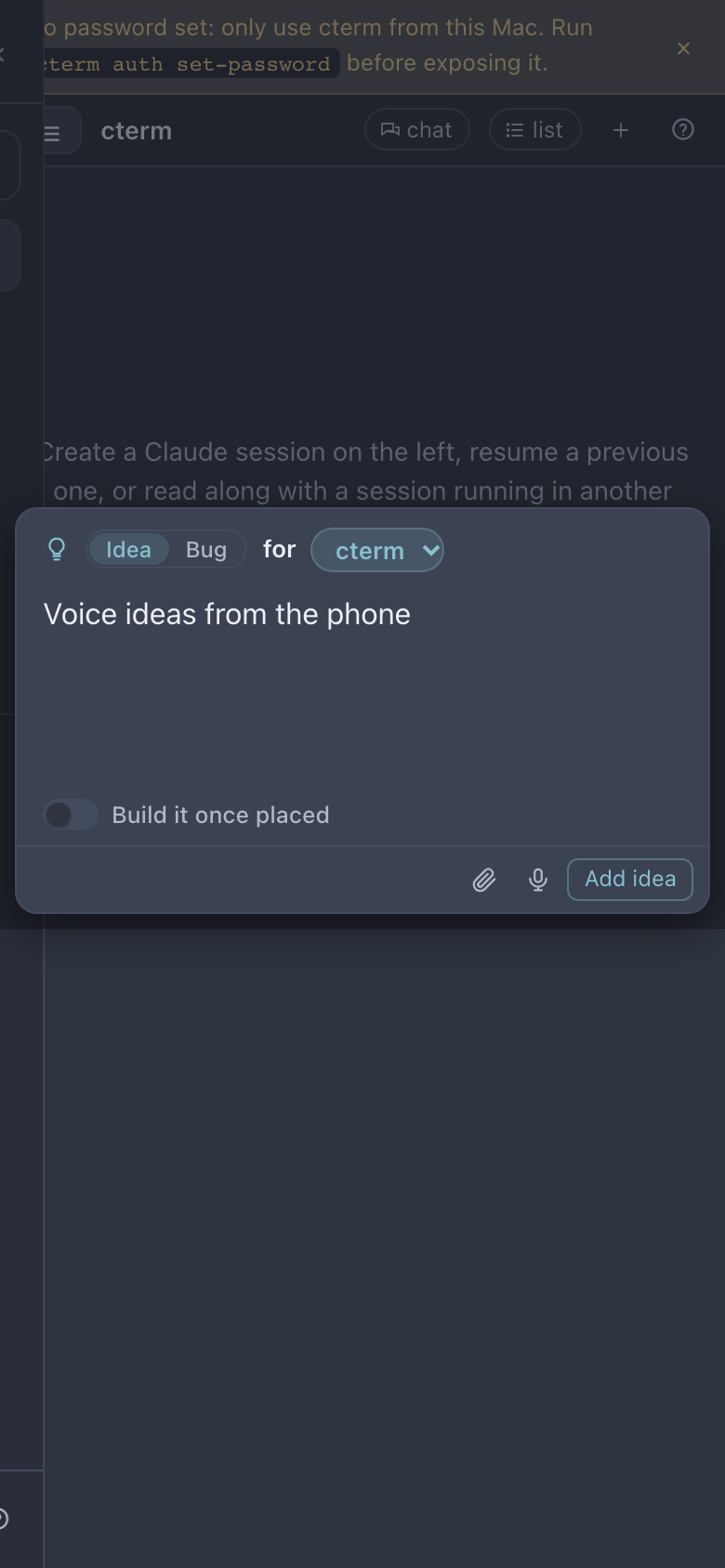
The idea palette (the light bulb in the sidebar's head, or Cmd/Ctrl+I) has the same microphone beside Add
idea; what you say lands in the idea's text. The master chat's box has one too, and while the chat's newest card is
something a session waits on you for, what you say answers it: "sí" allows or approves, an option's name picks it
(answer what your sessions wait on you for).
On a phone the palette sits above the keyboard, so you can tap the microphone, speak and add the idea without the keyboard covering it.
idea-palette-shot.mjsPractise out loud
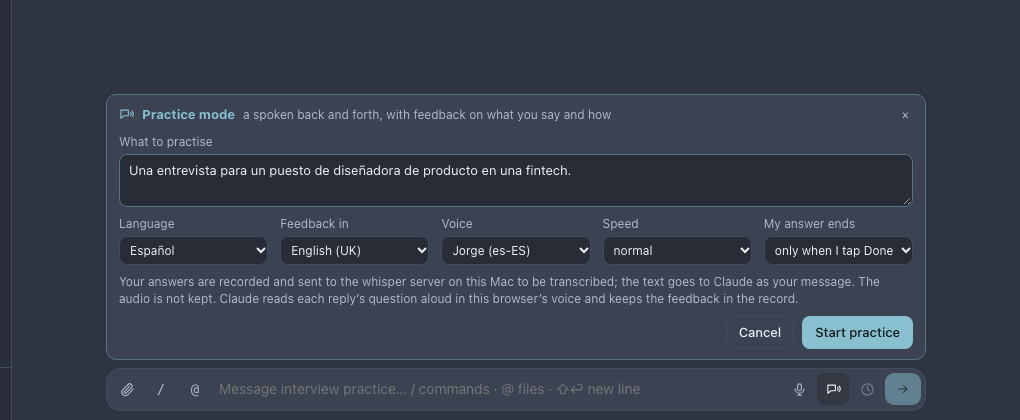
The speech-bubble button beside the microphone opens Practice mode over the prompt box:
- Under What to practise, describe the situation, for example an interview for a product design role.
- Pick the Language you will speak, the language the feedback should be in (Feedback in), and, for this device, a Voice, a Speed and how My answer ends (when you tap Done, or after a pause).
- Press Start practice.
practice-test.mjsClaude plays the other side. Each reply is read aloud in the browser's voice, then the microphone opens for your answer. Done sends it, Drop (or Esc) throws it away, Pause stops reading and listening, Skip answers before the reading ends, and Repeat reads the last question again. Your answer goes to Claude exactly as heard, with no tidying, because the mistakes are what the feedback is about.
Record opens what to improve: Claude's feedback on each answer, on content and on language. End asks Claude for a summary of the main things to work on, which joins the record; Copy takes it as markdown.
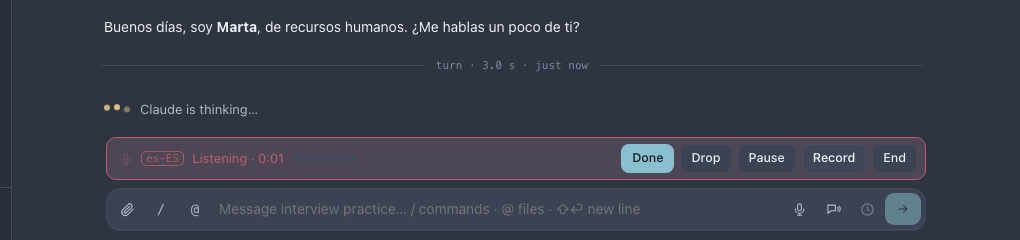
practice-test.mjsOnly the page you started on reads aloud and listens. Opening the same session elsewhere shows the bar with Talk here instead, so two devices never talk at once.
Set it up (on the Mac)
Voice is configured once, from a terminal on the Mac, with cterm voice. The simplest setup is a whisper server
on the Mac itself, kept running by launchd:
cterm voice local setup --model ~/models/ggml-large-v3-turbo.bin
cterm voice status
This uses Homebrew's whisper-server on 127.0.0.1:7435, waits for it to answer and points cterm at it; the
microphone buttons then appear. cterm voice local start|stop|status|remove manage it afterwards.
To use a whisper server elsewhere instead (whisper.cpp's /inference or an OpenAI-shaped
/v1/audio/transcriptions):
cterm voice set url https://whisper.example.com/inference
echo "$TOKEN" | cterm voice set token --stdin
cterm voice set language es          # or auto, the default
cterm voice set shaper off           # keep the raw transcript; the brief's model by default
cterm voice test recording.wav       # print the transcript and the tidied text
cterm voice set prompt sets a short vocabulary hint sent with each recording, and cterm voice off clears the
URL, which removes the microphone buttons.
How it works
The browser records with the microphone, then converts the recording to 16 kHz mono WAV itself, so neither the Mac nor the server needs a converter. It posts the audio to the daemon, which forwards it to the whisper server and never writes it to disk. The token stays in cterm's store and never reaches the browser. The one exception is a spoken note on My list: that recording is your note, so the daemon keeps it for you and has the same whisper server transcribe it, without the tidying.
The tidying is one claude -p call on the Claude login of the session you are speaking into (the default profile
for the idea palette), with no tools and nothing saved, as the brief does. It keeps your language, drops fillers and
false starts, turns spoken punctuation into signs, and never answers or adds anything. It also says whether the text
is a prompt, an idea or a command; a command only counts when you named it as one, so a stray /clear never
appears from an ordinary sentence. Anyone signed in can speak into their own sessions; three recordings are
transcribed at a time across the Mac. The code is in the daemon's voice.ts and the web app's voice.ts and
MicButton.tsx.
Scenarios
A prompt on the way to the station
Walking to the station, you open a session on your phone, tap the microphone and say "look at the failing login test, I think the cookie expires too early, don't change the session length". The box fills with a clean sentence; you fix one word and send.
An idea before it slips away
In a meeting you think of a feature. You press the light bulb (Cmd/Ctrl+I), tap the microphone, describe it in twenty seconds, and
press Add idea. The steward places it in the roadmap later.
Rehearsing an interview in Spanish
You start a practice for a job interview in Spanish with feedback in English. Claude asks about a project that went wrong; you answer out loud and tap Done. Each round's feedback quotes what you said and gives a better way to say it, and at the end the summary lists three things to work on.
Related
- The terminal and the prompt box: where the spoken text lands.
- The roadmap: the inbox your spoken ideas go to.
- The master chat: one box for everything, with its own microphone.
- cterm on a phone: where voice helps most.
- Remote access: the https address that lets a phone use the microphone.