
The roadmap and ideas
Every project in cterm can keep a roadmap: a tree of items, each with a status, a summary, what to build, the decisions taken and the notes people and sessions left on it. Beside it sits an inbox, where an idea or a bug report lands in a few keystrokes from anywhere in the app and waits for the steward to place it. The roadmap panel is where you read it, edit it, search it and ask it questions.
What it is for
- One place for the plan. Items have ids (
p2.1), a parent, a status and fields that say where things stand. Task sessions start from an item, read it as their brief and report back to it, so the roadmap stays true without anyone rewriting it by hand. - Ideas without opening a session. A thought, a request or a bug you just saw goes into the inbox in seconds. Nobody has to decide on the spot where it belongs: the steward triages the inbox later.
- Answers about the plan. The search finds words; the Ask tab answers questions such as "what is left in this phase" or "why was this dropped" by reading the roadmap, its log and the code.
How to use it
Set up a roadmap
A project without a roadmap shows an empty panel that offers two places to keep one:
- In the repo. In a Claude session in the project, run
/roadmap init. The roadmap skill writesdocs/roadmap.json, its logdocs/roadmap-log.jsonand a Stop hook into the repo, committed with the work. - Kept in cterm. Press Keep one in cterm, outside the repo… on the empty panel (the owner or an admin). Nothing is added to the project and nothing of it is committed; cterm keeps its history itself.
You can move an existing roadmap between the two later, from the Roadmap section of the project page's
Settings tab (Keep it in cterm instead… or Move it into the repo…), or with
cterm project set <owner>/<project> roadmap-in repo|cterm. The Roadmap and Ideas switches under
Features turn the panel and the inbox off for a project.
Open the panel
- Beside a session: the Roadmap button (a signpost) in the session's head. Its expand button gives the panel the whole main area, the Full view, and back; the session keeps running underneath. There is no full view on a phone, where the panel already fills the screen.
- Alone: Roadmap… in the project's menu (the ⋯ on its group head in the sidebar), or the Roadmap tab of the project page.
The panel has the inbox at the top, Now (the items in progress, next or blocked), then three tabs: Items, Log and Ask.
Read and edit items
Click a row to open the item's card under the list, and its expand button to open it large over the page. On the card you find the status select, Start a session (it starts the session and leaves you on the card, with a toast whose Open goes to it, and gives way to Open session while that session runs; see Task sessions and worktrees), Open session when a session works on it, and a ⋯ menu with Define this, Link the open session, Still valid?, Add a child, Rename… and entries to write a summary, where it stands (Today), what to build (To build, one requirement per line, each with a tick box; see When an item is done), when it is done (Done when) and what it leaves out (Out of scope).
Below come the sections that apply: the place in the queue, Asked (the original idea it was made of),
Today, To build, Done when, Out of scope, Related, and folded rows for Decisions,
Needs, Assessment, Notes, Sessions and Log. Text, decisions and needs edit in place: a pencil or + add, then Cmd/Ctrl+Enter saves and Esc
cancels. The note field at the foot (Add note) appends a dated line signed with your name, which the steward's
jobs and the sessions on the item read. A copy icon beside the id puts the bare id on the clipboard.
An item's id is a link
Wherever cterm shows text that names an item, p3.6.15 or p4.13, the id is a link to its card, drawn with a
dotted line under it and the item's title in its tooltip: in Claude's answers and your prompts, an item's
summary, Today, notes, decisions and needs, the inbox cards, the Ask tab's answers, the Log tab and the card's
Log, the steward's jobs, the changelog, the history's versions, the toasts, the sidebar's session rows and task
heads, the project page's sessions and Now strip, and the master chat. An id the project's roadmap does not have
(a typo, an item removed or folded into another) stays plain text, and so does an id inside a code block or a
link. The card opens where you are: beside the open session in the roadmap panel, in the panel itself when the
link is in it, on the project page's Roadmap tab, and from the master chat and the master view on the project's
roadmap in the app's window. The ids are each project's own, so a link reads the roadmap of the project its text
belongs to: a session row's, a chat card's.
The owner and admins edit; anyone else who sees the project reads. Only the owner starts sessions.
What makes an item ready to build
An item ready to build says four things, the way a well-defined issue does: the problem and the solution in its summary (two short paragraphs, Problem: and Solution:), what to build (To build), the conditions that say it is done (Done when, each one something you can check without reading the code) and what it does not cover (Out of scope). Its title is in plain words someone who does not read the code understands: the problem or the change first ("People can find an item by a word in its notes"), never a file or function name. A bug's summary says where it was seen, the steps, what was expected and what happened, who it stops, and the code suspected when known.
A planned or next item without acceptance criteria says Not ready: no acceptance criteria beside its status. Nothing is rewritten in a sweep: the steward writes the criteria when it places an idea or folds one into the item, a define session when it settles the item, and you can write them from the ⋯ menu. Done when ticks each criterion as the work meets it: the steward does it when it records a task session's outcome, and the owner can tick one on the card. Related lists the items the steward named when it placed or folded an idea here, the ones it read before deciding; a click opens each.
When an item is done
An item is done once every line of its To build is settled: ticked when it was built, moved to the item that takes it, or dropped with the reason. Hover an open line for Move… and Drop…. Move asks which item takes the line: that item gets the line in its own To build, and this one keeps it as a link to it. Drop asks why: the line stays, struck out, with the reason under it. The head of To build counts them, "1 of 6 · 1 dropped".
Until every line is settled, the status select offers done as done (lines open) and cterm refuses it, naming the lines; the steward's jobs and the roadmap script are refused the same way. So a done item's card reads what was built, where the rest went and why something was left. An item marked done before this rule may still have lines left open: under What it does they are marked "left open", with the count beside the heading, and you can tick, move or drop them there.
A parent stays done while some of its children are still to build, and says so: "3 open under it" beside its status on the card, and "done, 3 open under it" in the list. cterm counts the children each time; nothing is written for it.
What a done item built, and what it cost
A done item's card opens on its Built card: when it was merged and as which commit, the pull request, the commits, where the work lives, its changelog entries, a line of outcome and Open the session. Its Cost row says what building it cost: every task and define session on the item and every steward job about it, added together, with how many of each beside the figure. Hover it for the two apart. The figures are the list price Claude Code reports, the same as the project page's Cost tile: nothing is billed on a subscription. A session counts with what its status line last reported, and a steward job about two items counts half on each. cterm keeps these sums in its store, so they stay after it forgets old sessions and jobs. Jobs only count from the day they started naming their items (14 October 2026).
When a done item breaks again
When a session says something a done item built is broken again (its verdict, or cterm roadmap note <id> --kind
broke), or the steward places a bug report on it, the break shows on the card in red as Seen breaking since.
The note also lists its Suspects. These are the merges into main since the item was built that touched the
files its Built card names, newest first, at most ten. Each chip is the commit, linked to GitHub when the
repository is known, and the item that merge built, which opens with a click. Hover a chip for the merge's subject
and day. Each of those items also gets a concern note: "Suspect: p4.13.2 was noted broken after this item's merge
… touched its files", with the item that broke one click away. So whoever looks at the break starts from the likely
cause, and the session that built the suspect merge hears about it.
If the Built card's Where names a test file of the project, cterm also runs that test with git bisect from
the item's merge up to main, in a separate temporary checkout. Your own folder is left alone. The merge where the
test first fails then comes first, with a red border. When the test passes on main, or already failed at the
item's own merge, the chips stay as they were. The steward starts from the suspects when it records the session
or triages the report. When one plainly caused the break, it puts the fix on that merge's item as well.
When an item's Today may be stale
An item's Today says how things work before it is built, and it goes out of date as other work is merged. When
a Today is written, cterm keeps the files and functions its points name (a path such as worktrees.ts, or a
function written as afterMerge in worktrees.ts or afterMerge()) together with the main branch's commit at that
moment. After each merge into main, cterm checks the open items: when a function a Today names has changed, or a
file it names whole, the card says Today may be stale above the points. It lists what changed and the merges
that changed it, each linked to GitHub when the project's repository is known.
Git can tell that the code moved, but not whether the Today is still true. Rewrite the Today (the ⋯ menu's Write where it stands, or its pencil), which clears the mark, or run Still valid? from the ⋯ menu, which reads the code and gives a verdict. The project's Settings tab has Check stale Todays after a merge in its Roadmap section. With it on, cterm runs Still valid? by itself on the items a merge marked, one at a time and at most five per merge. It is off by default because each check is a model run, while the mark alone costs nothing.
Search, filter and sort
Type in Search the roadmap: every word must match the id, title, text, decisions, needs or notes. A session's
id, as the session list gives it, finds the notes it left and the items made from it. The tree
narrows to the hits with their parents, the inbox and the log narrow too, and Esc clears. The chips in
progress, next, pending (planned or later), blocked and done filter by status, and stale Today
keeps the items whose Today a merge marked. The select beside
them switches between tree order, tree, by value, added, newest first, added, oldest first, last
change, value, highest first and the order (what comes next), the steward's ranking, where the owner can
drag a row onto another. cterm remembers the search, chips, order, tab and folded items per project in this
browser, and says Filtered in the head with a clear when a panel opens filtered.
On a product's roadmap
When the project is a member of a product, its roadmap is the product's, and each item names the members it
touches. The card's Projects line has a chip per member: click one to add it or take it out. The first one
named is where Start a session on this starts the item's session, from the member's tab or the product page
alike; with none named the line says whose the item counts as, its parent's or the anchor's. The rows show the
members an item names as small chips. On the queue section, each file under Touches leads with the member it
is in: the one its prefix names (api:src/routes/users.ts), else the item's first project, dimmed. Work that
changes two members is one child item per project, the later waiting for the earlier one's merge.
The member's tab lists only the items that name it (the anchor's also those that name none), their parents shown muted for the path, and its own inbox. The pill in the head names the member, and all of Playground, with the product's name, opens the product page with everything.
The steward names the projects itself when it places an idea or ranks an item, and a bug report goes onto the project where its cause is, whichever member it was filed in: the product has one triage over every member's inbox (across a product).
The steward and sessions name them with the script: update <id> --projects api,web, add … --projects, and
--no-projects to clear them.
File an idea or a bug report
- Press the idea button in the sidebar's head (a light bulb;
+ ideain the top bar on a phone), or pressCmd/Ctrl+Ianywhere outside the terminal. - Choose Idea or Bug at the top and check the project after for (it starts on the open session's).
- Type it. Paste or drop screenshots, or use the paperclip; the microphone takes it by voice if voice input is set up.
- Press
Enteror Add idea (Report bug).Shift+Enterbreaks a line;Esccloses and keeps the draft.
A toast says "Idea filed in <project>'s inbox" with Open and Undo; Undo works until the steward has
triaged it. If the project refuses ideas (no roadmap, ideas off, not yours), the palette keeps your text and says
why. Build it once placed asks cterm to start a task session on the item as soon as the steward places it;
Cmd/Ctrl+B flips it without leaving the text, on Idea and Bug alike.
On Bug the same switch asks for the fix: once the steward places the report, as a new bug item or on the item
it concerns, a task session starts on it, even with the project's Start a session on each bug off. With that
setting on, the palette says so under the switch.
To report a bug about a particular session, use Report a bug… in that session's row menu: the palette opens on Bug with the session named, so the steward can read what happened at that turn. For a scratch session that turned into real work, Add to the roadmap… (row menu, or the signpost with a plus in its head) makes an item for it, linked to the session.
From a terminal, the same inbox takes:
cterm idea "Group the log by week" --folder ~/projects/site
cterm bug "The inbox count is off by one" --session "check the panel" --image shot.png
cterm bug "The save button does nothing" --build
--build is the palette's switch: on an idea it builds the item, on a bug report it starts the fix.
Work the inbox
The inbox lists untriaged rows, bug reports first with a red bug mark. A row's card shows who filed it, where a bug was seen and its images; Remove takes it back while no triage holds it. Triage now runs a steward job at once instead of waiting. When the steward needs your call, the row carries asked: open it, read The steward asks and reply in the field with Answer.
Ask the roadmap a question
Open the Ask tab, type a question and press Enter. Claude answers in the background, streaming the answer as
markdown with quiet lines for what it ran; Stop ends it. Each question becomes a topic you can come back to
and continue with Ask more, after a minute or a week; Remove deletes it. The owner or an admin asks;
others who see the project read.
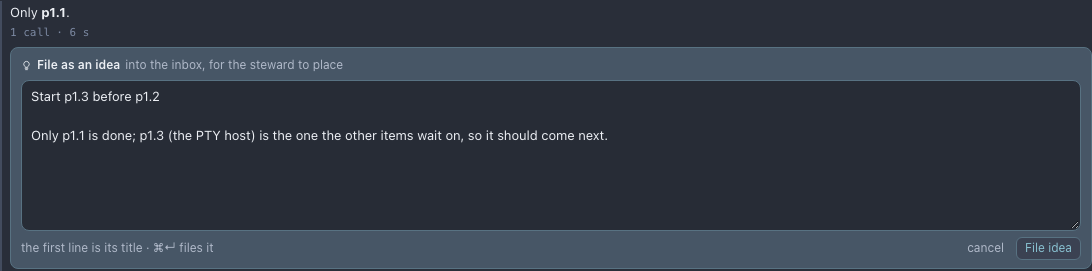
When a topic has settled something worth doing, File as idea under its last answer turns it into an idea for
the inbox. The topic's own conversation writes the draft, a title on the first line and a few lines on what to do
and why, naming the items it concerns; you edit it and press File idea (Cmd+Enter). It lands in the inbox
like any idea, with the toast's Undo, and the steward places it knowing which topic it came from. The answer
then says where it went: in the inbox, placed on an item, or dropped. If no draft comes back, the field holds the
answer itself to cut down, with the reason.
ask-roadmap-shot.mjsHow it works
The placed items live in docs/roadmap.json and the work log in docs/roadmap-log.json, or in
~/.cterm/roadmaps/<folder>-<hash>/ when the roadmap is kept in cterm (a git repository of cterm's own that it
commits to, never pushed). A project that is part of a product has the product's roadmap,
~/.cterm/roadmaps/product.<name>-<hash>/, shared by every member (Accounts, profiles and projects).
A project that joins with items of its own has them merged in by the script's product merge: under one new item
named after the project, p1 becoming p<n>.1, with its log and changelog carried along.
Every write, by the daemon, the card or the script, takes the same lock
(docs/.roadmap.lock), and the daemon watches the files and pushes the whole roadmap to every panel looking at
it, so an edit from a session or a terminal shows at once.
The inbox is not in the file: ideas, bug reports and their images wait as rows in cterm's store until the steward places them, then land on the item they became. Notes a session's model takes as it works also wait in the store, shown with a not yet in the file chip, until the steward copies them in: when the session ends, or once it has sat idle for a few minutes on an item that is done or dropped, so a session nobody closes still gets its notes and its Built card. Under those notes the card says they wait for the session's outcome, and Record it now asks the steward for it at once.
Agents never read or edit the JSON directly: the roadmap skill's script is the only door (node
.claude/roadmap/roadmap.mjs show --overview first, or show --around <id> for one item with what is around it), and the Stop hook sends a session back when it edited the
file by hand. The hook asks a session to commit the roadmap files only when that session changed them with one of
the script's writing commands. A session that only read the roadmap (show, search) is never sent back over edits
that a steward job or another session left uncommitted, nor is one whose commands only quote a writing command, in a
prompt it scheduled, an idea or bug it filed or a commit message. The roadmap files a steward job wrote are the job's
until it commits them: no session is asked about them meanwhile. The same goes for the other files of a checkout that
several sessions share: a file another session saved while one of this session's commands ran stays the other's,
unless that command names it or a script it ran names it or keeps it in its own folder (the screenshots a shot script
redraws, a file a python script rewrites).
The stale mark is the script's stale command. After a merge, the daemon runs it in the project folder: for each open
item it reads the commits on main since the Today's commit, the lines of each cited function at main's tip with git log
-L and each file cited whole, and writes today.stale with the merges that touched them. The steward's merge job is
told which items the merge marked; it rewrites a Today the merge plainly changed and leaves the rest to the check. A
session started on a marked item has the changes in its brief. A Today written before cterm kept its cites gets them
read from its text, with the main branch's commit as of its date.
An Ask topic is a claude -p run in the project folder with read-only tools and its own Claude session id; a
follow-up resumes that session. It runs on the project's think model unless cterm ask model picks another.
File as idea is one more run on that session with no tools that saves nothing to it, so a later follow-up never
sees the draft; the filed row names the topic and its Claude session.
Scenarios
An idea on the bus
Away from your desk, you open the palette on your phone, pick the project, dictate a sepia theme and send. By the evening the steward has placed it under the theming phase, and the card's Asked section keeps your words.
Finding what is left before a release
You search "export", tick pending and blocked, and see four items. Unsure about one, you ask in Ask why it was postponed; the answer quotes the decision on its card and the log entry of that week.
A bug spotted in a session
A session shows a wrong count. You open Report a bug… from its row menu, describe it and drop a screenshot. The report names the session and turn, so the steward reads the transcript, finds the item that built the count and reopens it with a note instead of filing a duplicate.
Related
- The steward: the jobs that triage the inbox, record what sessions did and keep the order.
- Task sessions and worktrees: starting work on an item and merging it back.
- The project page: the Roadmap tab, the Now strip and the project's Settings.
- The master chat and decision mode: file an idea or ask the roadmap without picking a project.
- Voice input: dictate ideas into the palette.