
The navigator
A project's navigator is a map of what its app lets a person do. It covers each functionality (the idea palette, the session finder, the project page), the actions a person takes on it, and, for each action, its scenarios: the usual path, its variants and its edge cases. A scenario is written as steps. Each step pairs a sentence for the person ("Press Enter to file it.") with what a browser does (press Enter in the field), so the same entry can explain the app to someone and also be run by a browser. Claude sessions keep the map as they change the app. You read it, and run its scenarios, in the project page's Navigator tab.
What it is for
- One list of everything the app does. You can see at a glance what exists, where it is reached and what a person does there, without opening the code or reading the roadmap's history.
- Browser tests that read like a manual. Every scenario is a test a browser can run, and its steps read as instructions. When the app changes and a step no longer matches the page, the run fails on that step.
- A user guide that stays current. The skill writes the map out as a guide (
navigator.mjs doc), area by area, each action's steps numbered. - Something to hand to an agent.
navigator.mjs list --jsonlists every action with its scenarios. It is a catalogue of what may be done in the app for someone, and of how.
How to use it
Start a map on a project
The navigator is a skill, like the roadmap and the wiki. In a Claude session on the project, ask for
/navigator init, or run node <cterm>/skills/navigator/navigator.mjs init in the repo. It sets up:
- the folder (
docs/navigatorby default); - the app's settings: where the app runs, how a run signs in, its areas, and which files are its tests and its interface;
- the skill and the Stop hook, copied into the repo's
.claude/.
Then ask the session to build the map from what exists, area by area. A large app is mapped over several sessions, each saying what is left.
Read it
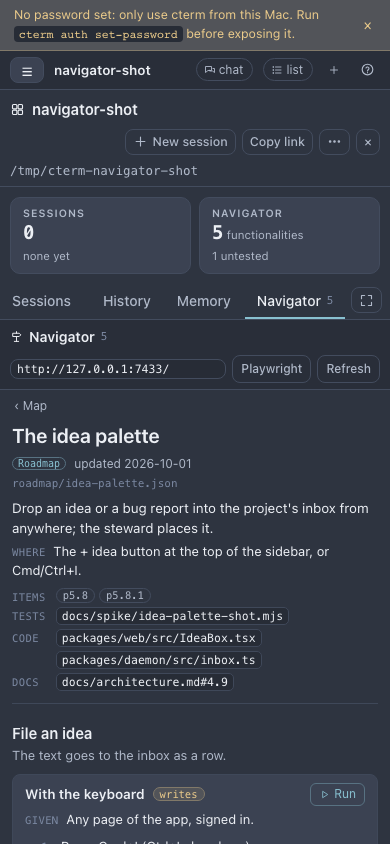
Open the project page and its Navigator tab (the tab, and a tile with the functionality count, appear once the repo has a map). The list column groups the functionalities by area, with a filter over their names, places and steps. Pick one to see:
- what it is for and where it is reached;
- the roadmap items that built it, the test scripts that cover it, the files that make it up and the docs that describe it;
- each action with its scenarios, and their steps as a numbered list.
Playwright shows the browser code under each step. A step that reuses another scenario links to it.
Coverage, at the top of the list, says what the map does not know yet: functionalities no browser test covers, actions with no scenario, and the test scripts and interface files no entry names. Problems in the files, such as a path that no longer exists or a step without its sentence, are listed there too.
Run a scenario
An admin sees Run on every scenario, and Run the safe ones on a functionality. The run streams back into the entry: a mark on each step, the error under the step that failed, and a screenshot of the page at that moment. Run against sets where the app runs for this project; it is the map's own address by default.
Each scenario says what it does to the app:
- none: it only looks and navigates, so it is safe anywhere;
- writes: it makes or changes something, such as a session, an idea or a setting;
- costs: it spends money or quota, such as a model call.
A scenario that writes or costs asks first and names the instance it will run against. Such scenarios belong on a scratch copy of the app, never on the one you work in.
On a phone the tab shows one column at a time: the map, then the entry you open.
navigator-shot.mjsHow it works
- The files are the truth. There is one JSON file per functionality in the repo, in the folder named in
.claude/navigator.json. A worktree session updates the map on its branch with the code: one file per functionality keeps two branches from colliding. - Targets are what a person sees: a button by its name, a field by its label, a text. A step that matches several elements fails rather than clicking one by luck.
- Two checks keep it honest.
lintchecks every file against the repo: the paths it names exist, ids are unique, every step has its sentence and one action.runchecks every scenario against the app itself. - The Stop hook asks a session once when it changed code an entry names and left the entry alone, or added an interface file no entry names. The session then updates the entries, or says in one line that they still hold.
- cterm reads the map with its own copy of the script, never code from the project. A run is that script's runner, Playwright in the project folder, streamed back to the admin who started it. One run per project at a time; it is stopped after 15 minutes or when the page goes away.
Scenarios
A change that keeps its map
A session moves the idea palette's Add button into its header. Before it stops, the Stop hook names the palette's entry, whose code changed while the entry did not. The session updates two steps and runs the scenario against a scratch daemon until it passes, then commits the entry with the code.
Checking a release
Before you merge a branch you open the Navigator tab and press Run the safe ones on the areas it touched. One scenario fails at "The toast says the idea was filed": the screenshot shows the toast now says "Idea saved". Either the words or the step is wrong. The map told you which, and where.
What is still untested
You open Coverage. It lists the functionalities no browser test covers and the actions nobody wrote a scenario for, so the next session knows where to start.
Related
- The project page: where the Navigator tab and its tile live.
- The wiki: the project's knowledge in prose, where the navigator is its app's map.
- The roadmap: the items an entry names, and what is planned but not built yet.
- Setup and skills: the navigator skill sits beside the project's other skills.
- Task sessions: a task session updates the map on its own branch.