
Modules
A module is a tab a project declares over the data an integration leaves behind: a sync with another system writes what it brought into a file, and the module shows that file as tables, says which run filled it, marks the rows that came in, changed or went away since the run before, and puts first the conflicts only a person can settle, each with the action that settles it.
What it is for
A run's summary says how many records changed. To look after an integration you need the records themselves: which workers came in this morning, whose site changed, who went away, and which differences between the two systems need a person to decide. A module is that view, kept by cterm from what the runs wrote, with a button on each thing to act on.
How to use it
Read a module
Each module is a tab after Files (and any pinned trackers), named by its title; its count is the conflicts to settle, red, or else the rows that changed since the run before. At the top of the tab:
- the latest run of what fills the module, under way or how it ended, with its summary;
- the counts and what the marks compare with: the run before, or the last run when the file changed after it (a run the record does not know, or a hand edit);
- the data file it reads, and the module's actions on the whole (Sync now).
Then the conflicts, first, each with the row it is about (a click shows the row in its table) and its action, and under them the conflicts the run before had and this one has not: settled. Then each table, with the tracker's sort and column filters:
- a new row is drawn in the accent;
- a changed row has a mark on its left, and each changed cell is underlined; its tooltip says what it was;
- a gone row stays at the foot of the table, struck through.
changed since the run before above a table keeps only those rows.
Settle a conflict
Press the conflict's action. When the action asks for inputs, its form opens filled from the row the conflict is about (and from what the conflict adds), saying where the values came from; check them and Run. The line under the latest run follows the run you started. When the next run of the integration no longer reports the conflict, it moves under settled since the run before.
Act on a row
A module may offer actions on each row (on one table's rows, or every table's). The button at the end of the row opens the action's form filled from that row's fields; a gone row offers none.
Write a module
A module is a file of the project, .cterm/modules/<id>.json, beside its actions and
workflows, so it is committed with the project and a session may write it:
{
  "title": "eGestiona",
  "description": "Workers and sites imported from eGestiona every morning",
  "data": "data/egestiona.json",
  "run": { "kind": "action", "id": "sync" },
  "actions": ["sync"],
  "rowActions": [
    { "action": "settle", "table": "workers", "label": "Settle", "inputs": { "worker": "id" } }
  ]
}datais the data file, relative to the project folder.runnames what fills it, as the project's record of runs names it: an action by its id, a workflow by its file, a routine or a monitor by its id or its name (kindisaction,workflow,routineormonitor). A workflow launched by an action runs as that action, so name the action.actionsare the project's actions offered on the whole module, by id.rowActionsare actions offered on each row:tablenarrows one to a table, andinputsmaps an input of the action to the column it takes ("worker": "id"); an input with no mapping takes the column of the same key.keepis how many runs' data cterm keeps (5 by default, 2 to 20).
The data file is whatever the integration's script writes:
{
  "tables": {
    "workers": {
      "title": "Workers",
      "key": "id",
      "columns": ["id", { "key": "name", "label": "Name" }, "email", "site", "status"],
      "rows": [
        { "id": 102, "name": "Bo Lind", "email": "bo@example.com", "site": "BCN", "status": "active" }
      ]
    }
  },
  "conflicts": [
    { "id": "bo-email", "text": "Bo Lind has another email in eGestiona", "table": "workers", "row": 102,
      "action": "settle", "inputs": { "side": "theirs" } }
  ]
}tablesis an object of tables by name, or a list of tables each with itsname. A table'skeyis the column that tells its rows apart (idwhen there is one, else the first column);columnsare names or{ key, label }, and without them the rows' own fields are used. A row is an object, or a list in the columns' order.- A conflict has its
text, and may name thetableandrow(its key) it is about, theactionthat settles it andinputsit adds to the row's. Give it anidthat stays the same from run to run, so cterm knows it is the same conflict; without one its table, row and text stand for it.
A module or data file that does not read shows its tab with a line saying why, and the rest of the page works; what is left out of a file that reads (a row past 5,000, a repeated key) is said under the head.
From the master view
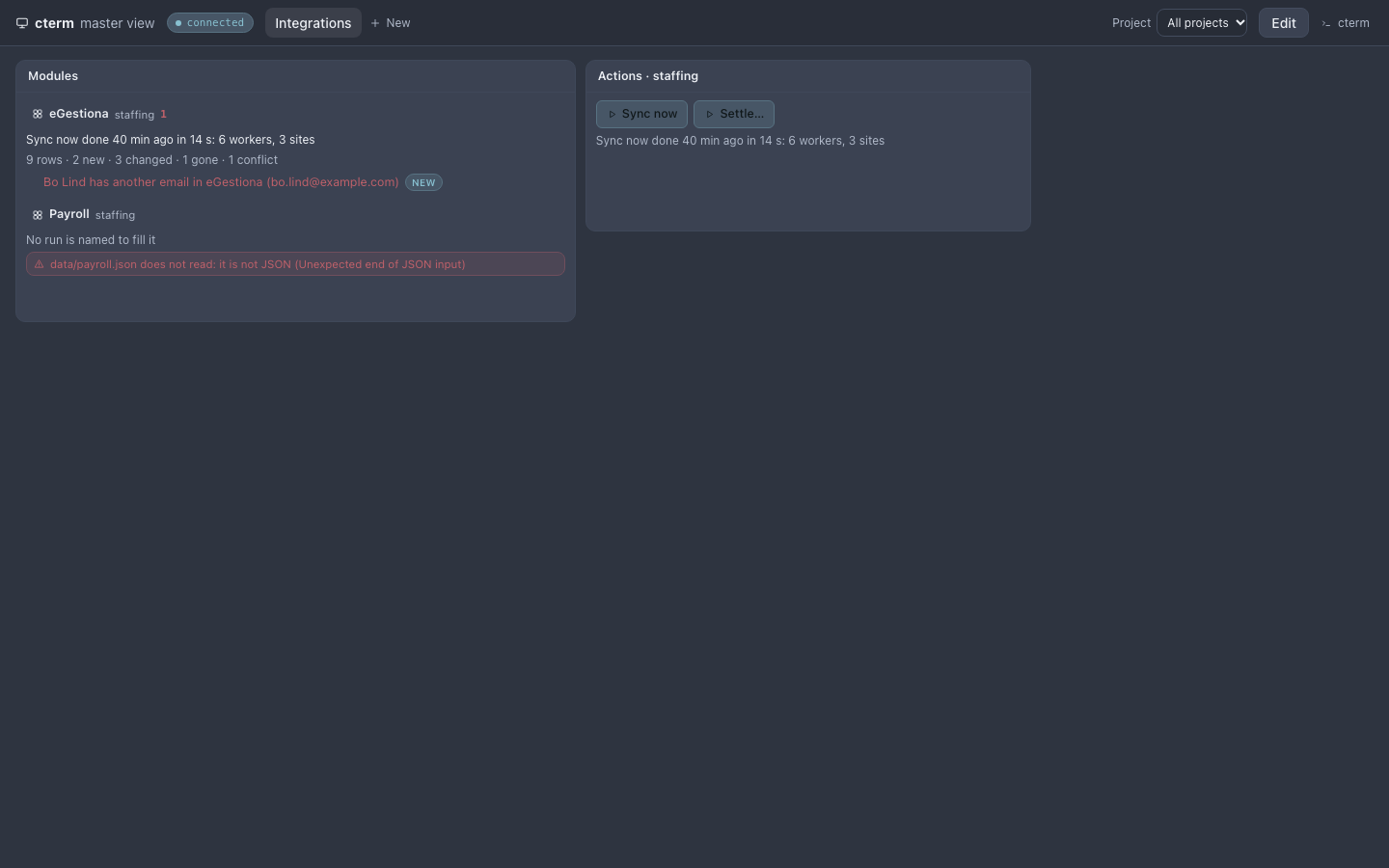
The Modules panel lists every project's modules, or one project's: the last run, the counts and the conflicts, the modules with conflicts first. A click opens the module's tab on its project's page.
modules-shot.mjsHow it works
cterm reads the module's file and its data file each time the tab looks, and watches both, so a session's or a run's write reaches the open pages within a couple of seconds. When a run that fills the module ends well (ok, or ok with something to look at), cterm keeps the data file as that run left it, beside the run on the record, the last few of them; the marks compare the file as it is now with the run before. Nothing in a module is written by cterm: a row's or a conflict's button is a launch of the project's action, checked by the daemon as any launch is (its inputs, who may launch it, whether it runs a script), and recorded with the values it was given.
Scenarios
The morning import
A routine runs Sync now at seven. By nine the tab says it brought six workers and three sites, that two workers are new and one went away, and that Bo Lind's email differs between the two systems. Settle… on that conflict opens with Bo's id and "theirs" filled in; its run keeps the other system's email, and the next morning's import no longer reports it.
Related
- Actions: what a module's buttons run.
- Workflows: how a script says what it did.
- The project page: where the tab sits.
- The master view: the Modules panel.