
The merge gate and the merge queue
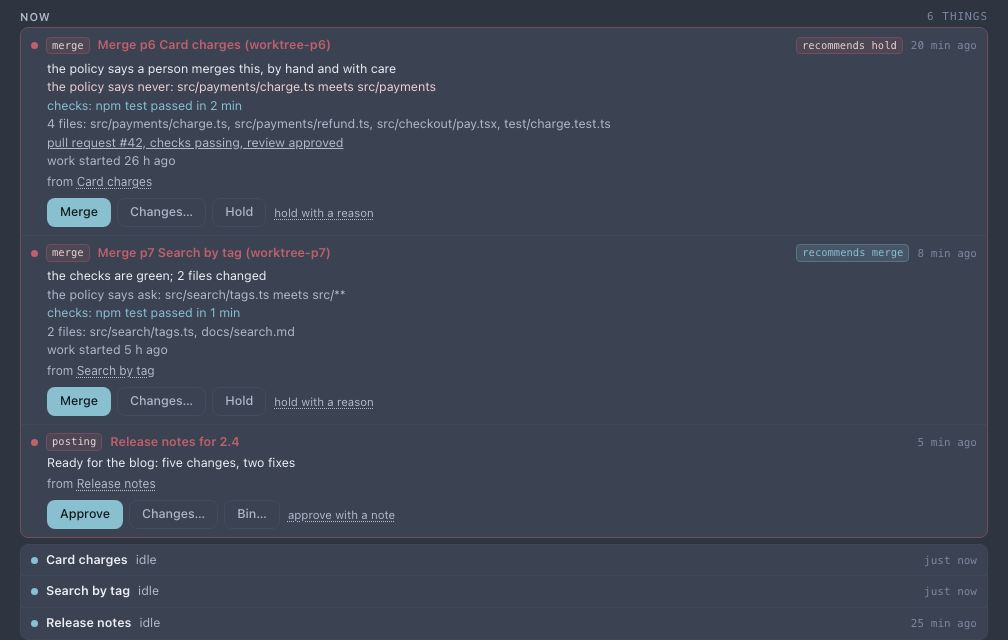
When a task session finishes its work, cterm can merge its branch into main by itself (the project's Merge a finished session by itself). The merge gate decides which branches it may merge alone. It reads the project's policy, the same one the cycle uses: a branch that touches only what the policy lets ship alone is merged once its checks are green. Every other branch waits in the project's merge queue with the evidence you need to decide in a minute.
merge-queue-shot.mjsWhat it is for
Before, the merge switch merged every finished task session it covered, or none. A change to the docs and a change to how payments work went in the same way. With a policy:
- Safe changes go in alone. A branch whose every file is in Ships alone is merged as soon as the project's before-merge command (its tests) passes, then the session is closed and cleaned up, as before.
- The rest waits for you, with its evidence. A branch the policy says to ask about, or never to merge alone, is not merged. Its checks are run, and it goes into the merge queue with everything you need to decide.
- You answer from anywhere. The queue is on the project page and in the master chat's Waiting on you, and a new entry is sent to your phone.
How to use it
- In the project's Settings tab, under Task sessions, set Merge a finished session by itself to A bug's session or Every task session. Set Before a merge to the command that runs the tests.
- Under How far cterm goes, The cycle, fill in the policy (below). With no policy at all, the switch merges every finished session it covers, as it did before.
- When a branch waits, its entry shows first in the project page's Now strip, and in Mine under the
Situation. Read the evidence and choose:
- Merge: cterm merges the branch into main as the session's owner. It runs the checks again first, since the branch may have moved. Then the session is closed and its worktree removed.
- Changes…: say what to change. The session reads it. When its next turn ends, its branch goes through the gate again.
- Hold: the branch stays as it is, for you to merge later from the worktree chip. hold with a reason keeps your words on the entry.
The policy
Three lists, one entry a line:
- Ships alone (
auto): merged by itself once green, when every file the branch changes is here. - Asks first (
ask): waits in the merge queue. A file no list names waits too. - Never by itself (
never): waits in the merge queue, recommended to hold.
An entry is a path or a glob (docs/, *.md, src/payments/**), title:<words> (matched in the item's title) or
kind:bug (the item is a bug, or kind:idea for every other item). Never wins over Asks first, and Asks
first wins over Ships alone. So with kind:bug in Ships alone, a bug's fix merges alone unless it touches
something another list names.
The evidence
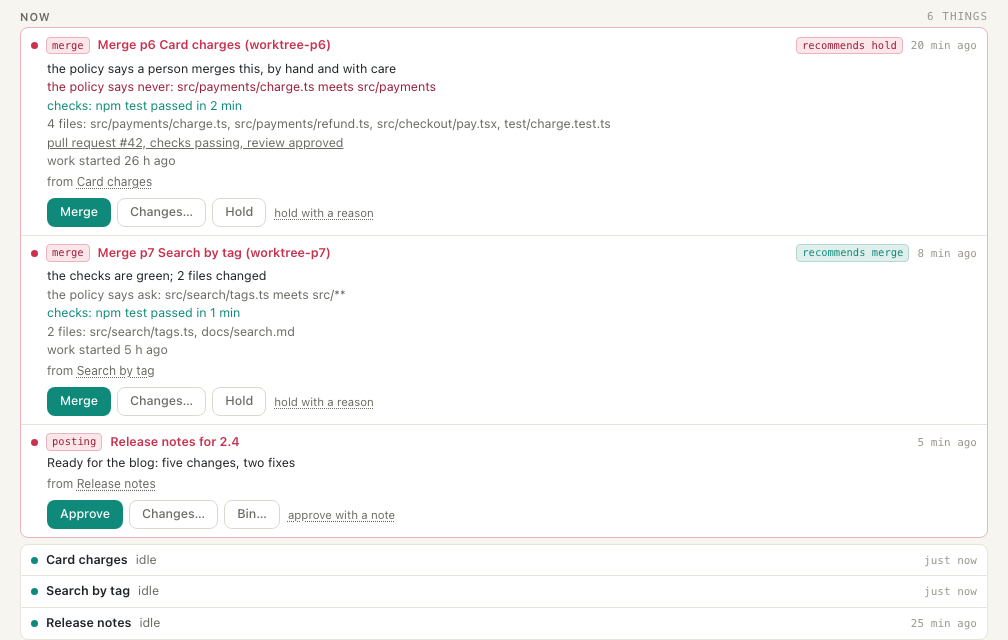
Each entry in the merge queue carries:
- A recommendation: hold when the policy says never, the checks failed, the pull request's checks fail, a review asks for changes, or the branch conflicts with main. Otherwise, merge.
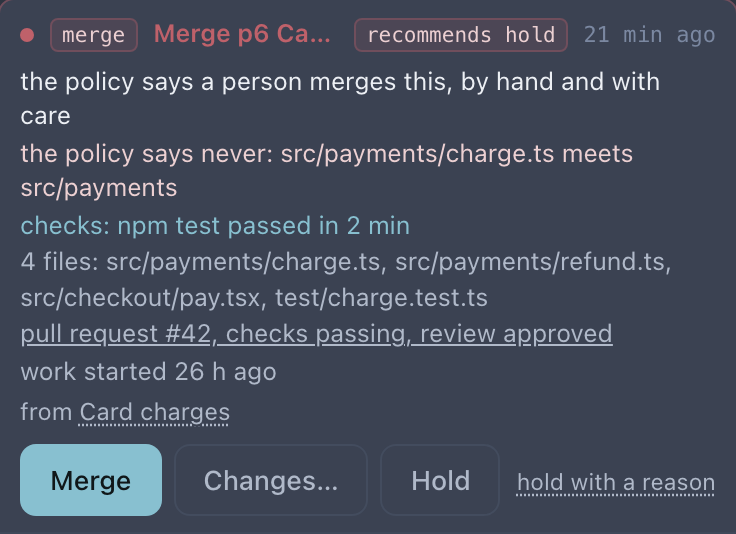
- The class and why: the entry and the file that decided it, such as "the policy says never: src/payments/charge.ts meets src/payments".
- The checks: the before-merge command with how it ended and how long it took. A branch whose checks fail is never queued. The session gets the output to fix, as for any merge cterm makes by itself.
- The files the branch changes, the pull request with GitHub's checks and review when the project works through pull requests (its link is where a preview is reached), and the work's age.
The same evidence is written as plain lines in the entry, so the phone's notification and the master chat's card carry it too.
merge-queue-shot.mjsHow it works
- The gate runs at a turn's end. When a covered session ends a turn with its work committed, a clean tree and nothing pending, cterm reads the files its branch changes against main and its item's kind, and classes the branch by the policy.
- Auto merges at once, through the before-merge command, as the switch always did.
- Ask and never run the before-merge command in the worktree. A red run goes back to the session with its output. A green run, or none set, puts the branch in the merge queue. The session's worktree chip then says it waits there.
- One entry per branch. When the gate looks at a branch again, its older entry is withdrawn. A branch merged another way (the worktree chip, the cycle) takes its entry out of the queue.
- The cycle's merges take the same path. At ship, a merge the cycle proposes goes through the gate: auto merges and is cleaned up, the rest is queued. For the cycle, a project with no policy means a person decides everything.
merge-queue-shot.mjsScenarios
Docs alone, payments asked
Policy: Ships alone docs/**, Never by itself src/payments. A session that only rewrote the guide finishes:
its tests pass and it is merged and cleaned up without a word. A session that changed how refunds are charged
finishes: its tests pass, and it waits in the merge queue, recommended to hold, with its checks. You read the diff
from its pull request and tap Merge.
A bug's fix goes in alone
Add kind:bug to Ships alone. A bug's session that touches nothing in Asks first or Never by itself merges
once green, whatever files it changed.
Related
- The cycle, whose policy this is and whose merges go through the gate.
- Task sessions, the worktree, the before-merge command and Merge a finished session by itself.
- The master chat, where a waiting entry is a card you answer.